
How to Use the ByteDance Speech Synthesis Channel
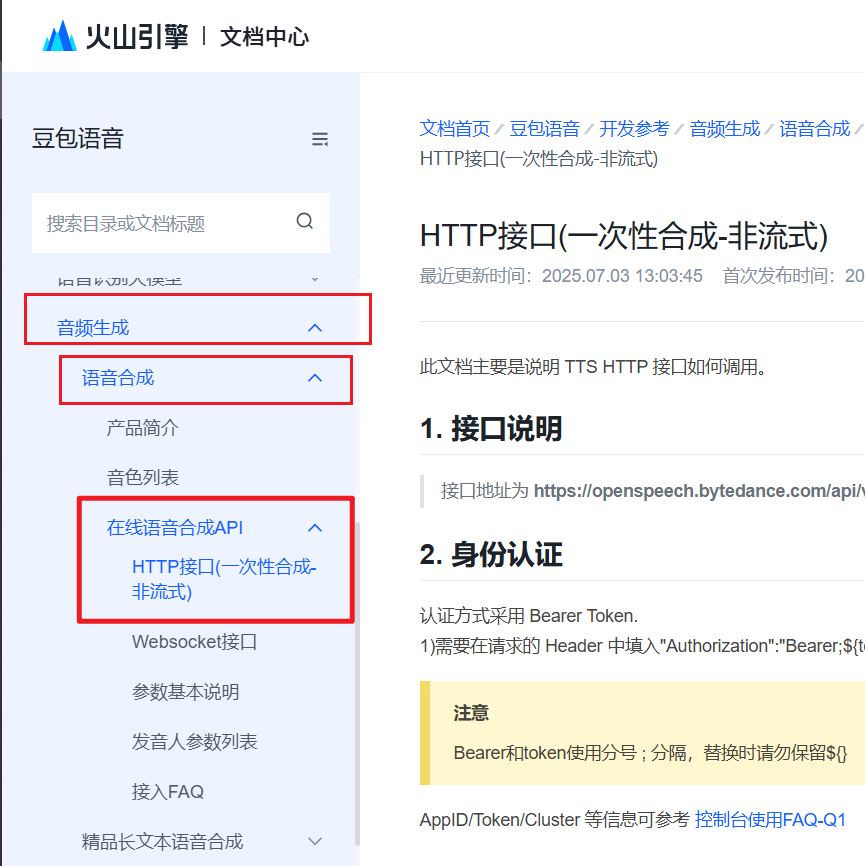
Please note: ByteDance has many speech synthesis products with similar names. This channel corresponds specifically to
Audio & Video Generation --> Speech Synthesis --> Online Speech Synthesis APIin ByteDance's services. Please ensure accuracy, otherwise it will not work.
Supported Chinese Voices
Only some Chinese voices are shown here. For voices in the other 7 languages, please visit: https://www.volcengine.com/docs/6561/97465
Many Chinese voices are supported, including various dialects and popular movie commentary voices like "Xiao Shuai" and "Xiao Mei" from Douyin.
| Voice Name | voice_type |
|---|---|
| Cancan 2.0 | BV700_V2_streaming |
| Yangyang | BV705_streaming |
| Sunny Youth | BV123_streaming |
| Anti-Rolling Youth | BV120_streaming |
| Common Son-in-Law | BV119_streaming |
| Ancient Style Young Lady | BV115_streaming |
| Domineering Young Uncle | BV107_streaming |
| Simple Youth | BV100_streaming |
| Gentle Lady | BV104_streaming |
| Cheerful Youth | BV004_streaming |
| Sweet Young Lady | BV113_streaming |
| Elegant Youth | BV102_streaming |
| Sweet Xiaoyuan | BV405_streaming |
| Kind Female Voice | BV007_streaming |
| Intellectual Female Voice | BV009_streaming |
| Chengcheng | BV419_streaming |
| Tongtong | BV415_streaming |
| Kind Male Voice | BV008_streaming |
| Dubbed Film Male Voice | BV408_streaming |
| Lazy Little Sheep | BV426_streaming |
| Fresh Literary Female Voice | BV428_streaming |
| Inspirational Female Voice | BV403_streaming |
| Wise Elder | BV158_streaming |
| Loving Grandma | BV157_streaming |
| Rap Guy | BR001_streaming |
| Energetic Commentary Male | BV410_streaming |
| Movie Commentary Xiao Shuai | BV411_streaming |
| Commentary Xiao Shuai - Multi-Emotion | BV437_streaming |
| Movie Commentary Xiao Mei | BV412_streaming |
| Playboy Youth | BV159_streaming |
| Live Streaming Queen | BV418_streaming |
| Anti-Rolling Youth | BV120_streaming |
| Calm Commentary Male | BV142_streaming |
| Dashing Youth | BV143_streaming |
How to Activate
- Register, Log In, and Complete Real-Name Verification
https://console.volcengine.com/
Open the link to register, log in, and complete real-name verification.
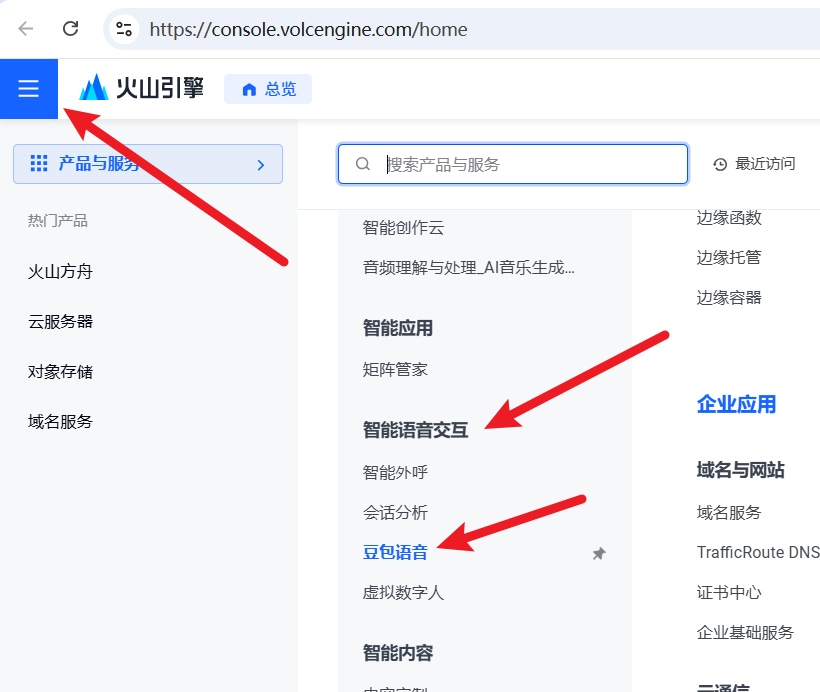
- Go to the Console and Create an Application: The ByteDance console is cluttered with many similarly named menu items. Please ensure you navigate to
Speech Synthesisunder Audio & Video Generation. Follow the image below to enter.
Or directly click this link: https://console.volcengine.com/speech/app
Note: In the top left corner, please switch to Legacy Version. The new version is too messy and difficult to navigate.
Follow the image below: Legacy Version --> Application Center --> Application Management --> Create Application

Fill in the name and description arbitrarily, but crucially, check the box for Speech Synthesis --- Speech Synthesis. There are many similarly named Speech Synthesis options; you must select the one that is simply the four characters 语音合成 (Speech Synthesis).
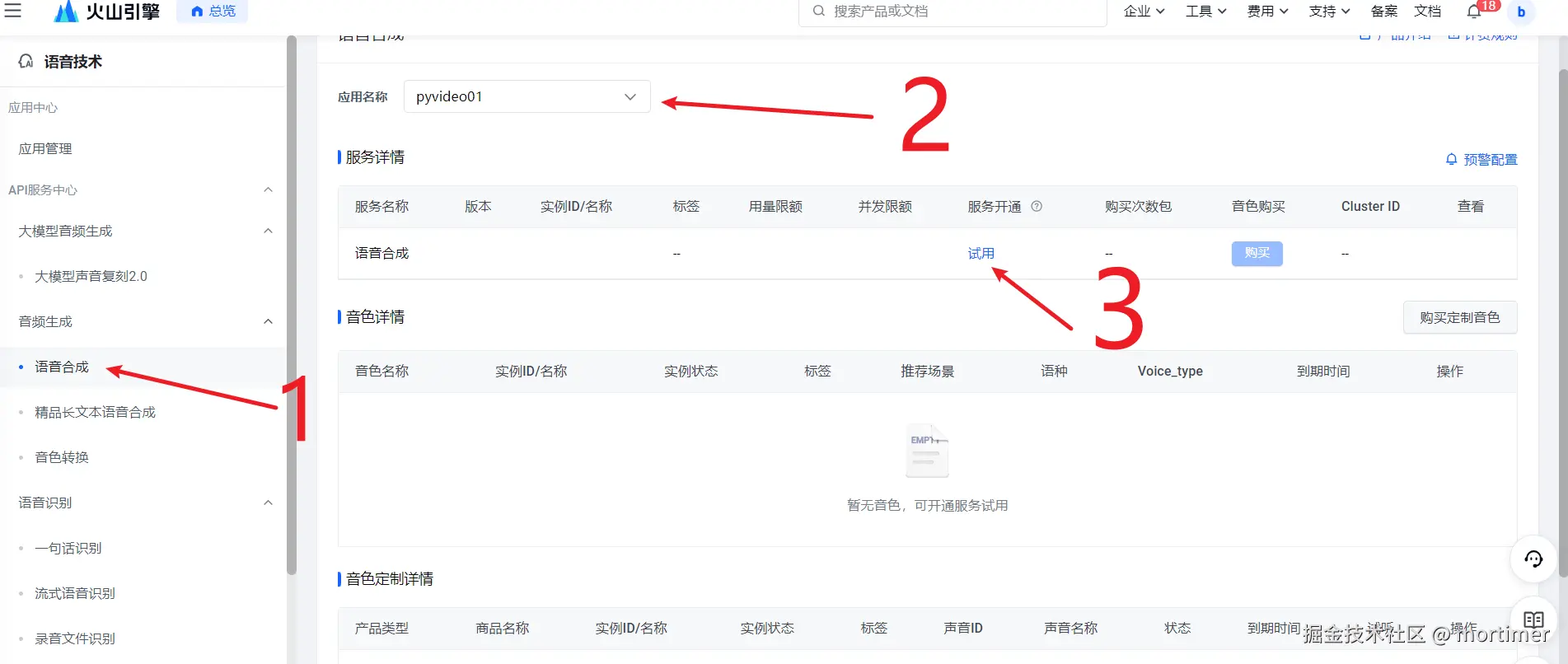
- Activate Trial or Official Service Next, go to the Speech Synthesis page to activate the free trial.
Navigate to: https://console.volcengine.com/speech/service/8
At the top, select the application you just created and click "Trial" to activate.
- Copy Information for Use Copy three parameters to fill into the video translation software.
The first is cluster id. Copy the name under cluster id as shown in the image.
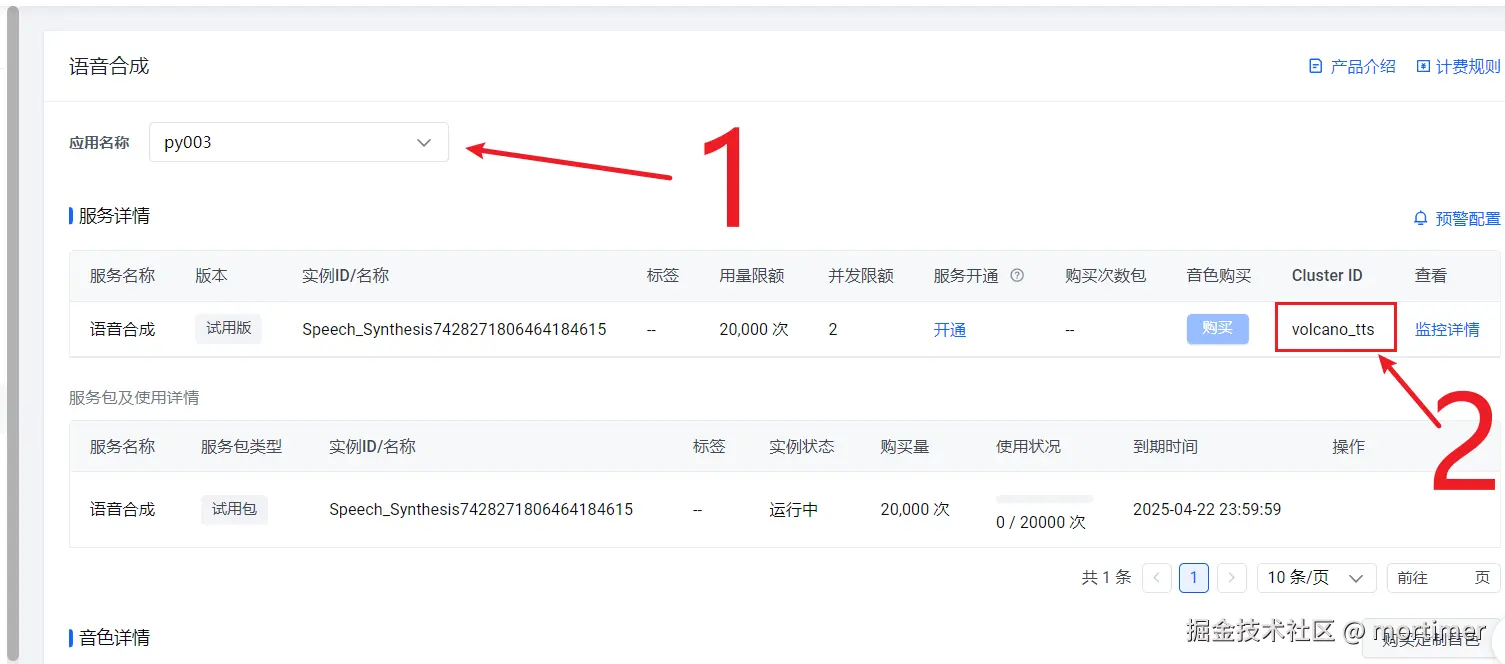
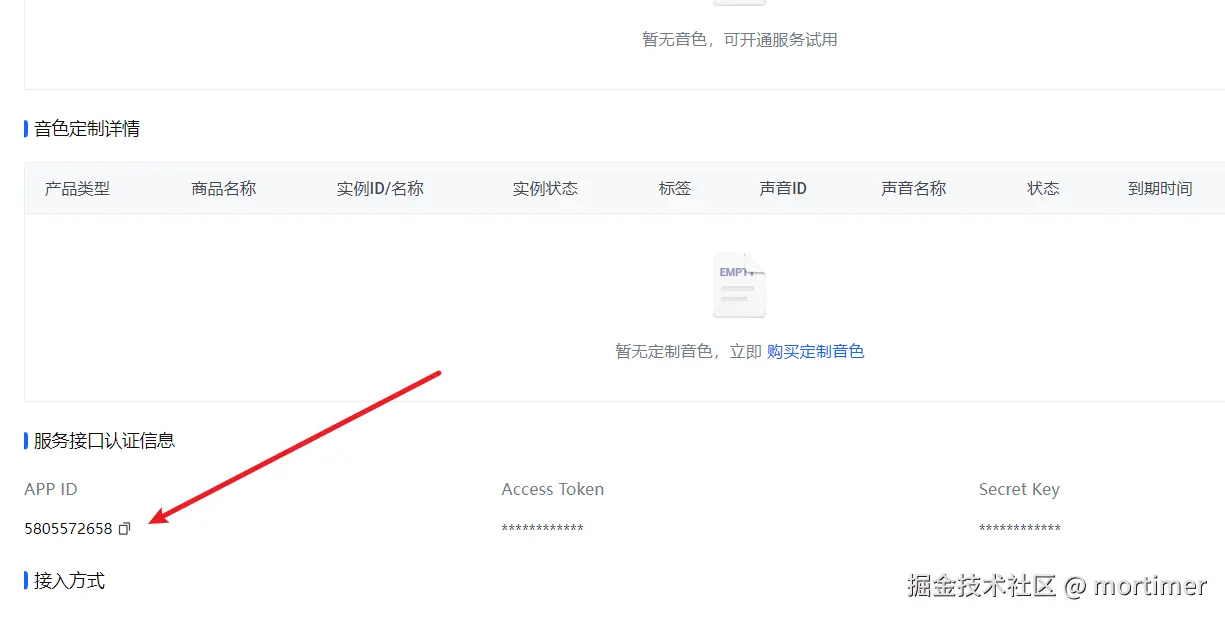
The second is App id. Scroll down on the same page to find it.
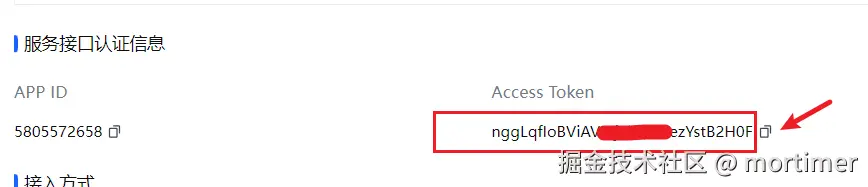
The third is Access Token. It's to the right of App id. Copy it.
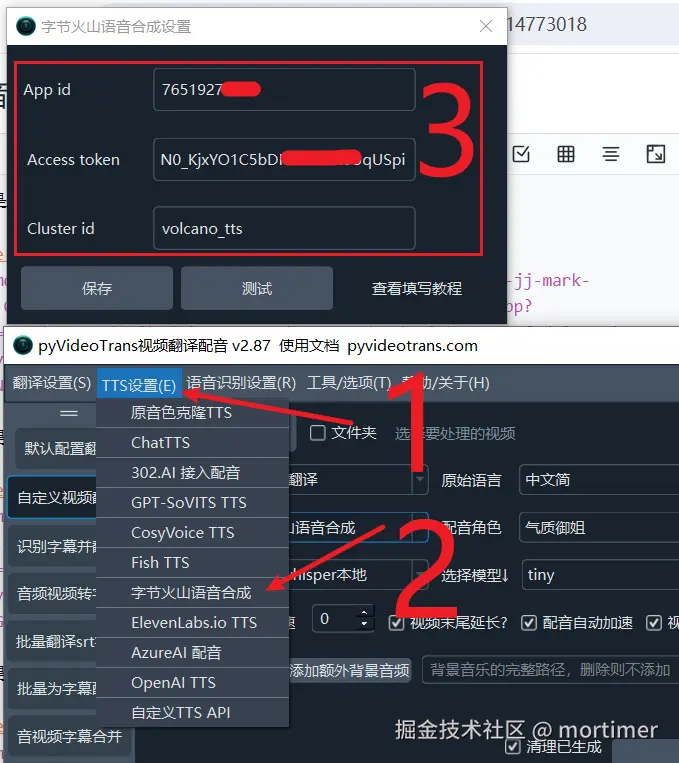
- Fill in the Video Translation Software Open Menu - TTS Settings -- ByteDance Speech Synthesis window in the software, fill in the details, test to ensure no issues, and save.
Using it in the Video Translation Software
After filling in and testing successfully, first select the target language in the software, then choose ByteDance Volcano Speech Synthesis in the voiceover channel. You can click to preview each voice.
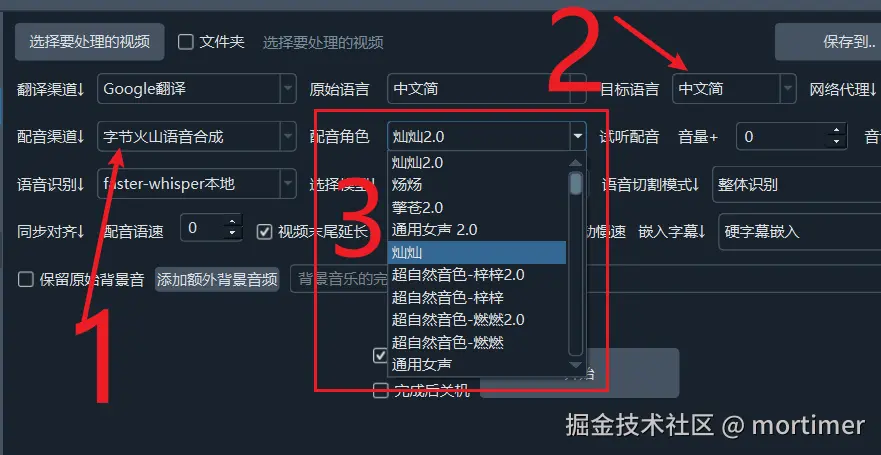
Select a satisfactory voice to start the voiceover process.
Important Notes
If you activate the official paid version, by default only the Generic Male and Generic Female voices are available. All other voices need to be purchased and activated separately in the ByteDance Volcano Engine console.