
What is FunASR Chinese Recognition?
FunASR is an end-to-end speech recognition model suite open-sourced by Alibaba's DAMO Academy. It significantly outperforms the Whisper series in Chinese speech recognition. Built on the Sound-Stream framework and trained on large-scale Chinese data, it handles Chinese pronunciation, dialects, and noisy environments with strong adaptability.
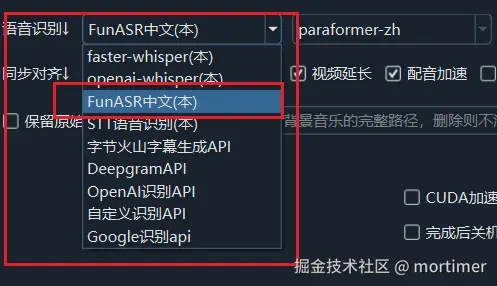
The video translation software has integrated FunASR as one of the available speech recognition (ASR) channels — simply select it in the software, no need to deploy external services separately.
Prerequisites
- Video translation software version >= v2.97 (earlier versions required manual deployment of
zh_recognorSenseVoiceservices) - NVIDIA GPU recommended: FunASR runs fastest with CUDA acceleration; CPU-only is possible but much slower
- On first use, models are automatically downloaded from modelscope.cn, requiring network connectivity
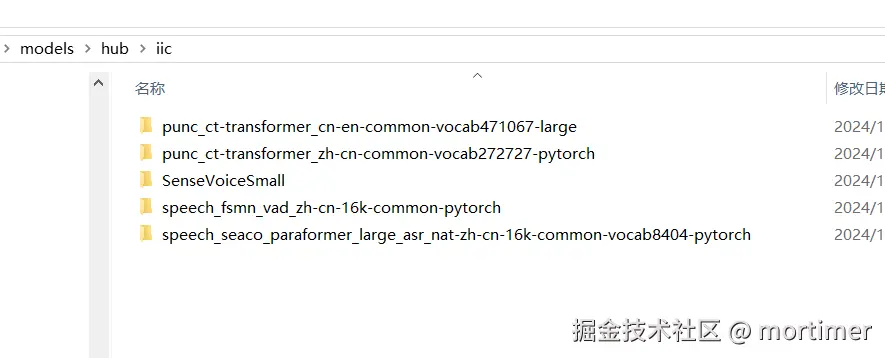
- Models are saved in the
models/hub/folder within the software directory; subsequent uses do not require re-downloading
Model Selection Guide
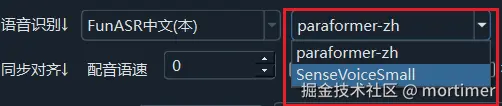
After selecting FunASR Chinese Recognition in the speech recognition settings, multiple model options will appear:
| Model | Use Case | Notes |
|---|---|---|
| paraformer-zh | Chinese recognition (recommended) | Best accuracy and speed; supports hotword feature |
| SenseVoiceSmall | Chinese recognition | Lightweight model, faster but slightly less accurate than paraformer |
| Fun-ASR-Nano-2512 | Chinese/English/Japanese/Cantonese | Good for mixed-language or lesser-used language scenarios |
| Fun-ASR-MLT-Nano-2512 | Other languages | For languages beyond the four listed above |
Recommendation: If your video is primarily in Chinese, choose paraformer-zh for the best accuracy and speed.
Detailed Model Information
paraformer-zh (Recommended)
This is the most established Chinese recognition model in FunASR, based on the paraformer architecture. On first use, it automatically downloads the following 4 model components:
- ASR model:
speech_seaco_paraformer_large_asr_nat-zh-cn-16k-common-vocab8404— core speech recognition model - VAD model:
speech_fsmn_vad_zh-cn-16k-common— voice activity detection for automatic audio segmentation - Punctuation model:
punc_ct-transformer_zh-cn-common-vocab272727— automatic punctuation (all models download this) - Speaker verification:
speech_campplus_sv_zh-cn_16k-common— speaker feature extraction
All models are sourced from modelscope.cn. The download process displays progress — please wait patiently.
SenseVoiceSmall
A lightweight multilingual model developed by Alibaba's Tongyi Speech team. On first use, it downloads the iic/SenseVoiceSmall model. Smaller than paraformer-zh, suitable for scenarios where speed is prioritized over maximum accuracy.
Fun-ASR-Nano-2512
A lightweight multilingual model supporting Chinese, English, Japanese, and Cantonese. Ideal for processing videos with mixed-language content.
Fun-ASR-MLT-Nano-2512
A multilingual extension model supporting languages beyond those four listed above. If your video contains languages other than English and Japanese (such as Korean, French, etc.), choose this model.
Usage Steps
Step 1: Select the Recognition Channel
In the software's Speech Recognition settings, select FunASR Chinese Recognition.
Step 2: Choose a Model
Select the appropriate model based on your video's language. For Chinese videos, choose paraformer-zh.
Step 3: Wait for Model Download (First Use Only)
The first time you use a model, the software automatically downloads it from modelscope.cn. The download progress is displayed in the software interface.
- Model save location:
models/hub/folder within the software directory - Download time: varies by network speed, from a few minutes to tens of minutes
- After download, subsequent uses do not require re-downloading
Step 4: Start Recognition
After the model download is complete, simply click Start and the software will perform speech recognition automatically.
Configuration Tips (Best Practices)
- Use GPU acceleration: Ensure CUDA is installed on your system — FunASR will automatically use GPU acceleration, boosting recognition speed several times over
- Choose the correct model:
- Chinese videos → paraformer-zh (best results)
- Chinese-English mixed → paraformer-zh (already supports mixed-language recognition)
- Pure English → consider using Whisper or faster-whisper instead
- Japanese → Fun-ASR-Nano-2512 or Fun-ASR-MLT-Nano-2512
- Use hotwords: paraformer-zh supports hotword settings — you can add professional terms, names, etc. to improve recognition accuracy
- Allow time for first use: The first use of any model requires a download — ensure a stable network connection and wait patiently for the download to complete
Common Errors and Troubleshooting
Download failure or download stuck
- Cause: Unstable network connection to modelscope.cn
- Solution: Check your network connection and try restarting the software to re-download. If it continues to fail, you can manually download the model files from modelscope.cn and place them in the
models/hub/directory
Empty or garbled recognition results
- Cause: Selected model does not match the audio language
- Solution: Confirm you selected a model that matches your video language (choose paraformer-zh for Chinese videos)
Very slow recognition
- Cause: Running on CPU without GPU acceleration
- Solution: Check that CUDA and the matching PyTorch version are installed, and that the GPU is available
Missing model file error
- Cause: Model files are incomplete or corrupted
- Solution: Delete the corresponding model folder under
models/hub/and restart the software to re-download
Missing punctuation
- Note: The punctuation model (
punc_ct-transformer_zh-cn-common-vocab272727) is automatically downloaded when selecting any FunASR model. If punctuation results are poor, verify that this model was downloaded completely.