
OpenAI Speech Recognition API Guide
What is OpenAI Speech Recognition?
OpenAI Speech Recognition uses OpenAI's API to convert speech in audio or video to text. pyVideoTrans integrates OpenAI's speech recognition interface, supporting multiple models including the classic whisper-1 and the latest gpt-4o-transcribe series, enabling automatic generation of accurate subtitles for videos.
Prerequisites
- A paid OpenAI account (API usage requires payment)
- A valid OpenAI API Key
- pyVideoTrans software version v2.59 or higher (for the auto-detect language feature)
Configuring the OpenAI API
Log in to your account on the OpenAI website (https://platform.openai.com/) and navigate to the API Keys page to create a new API Key.
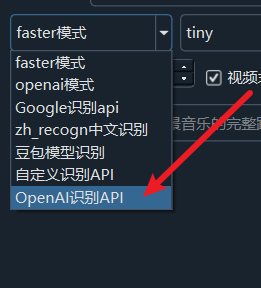
Open pyVideoTrans and navigate to the menu's "Speech Recognition Settings", then select "OpenAI Speech Recognition API".
In the configuration window:
- API Key: Paste your OpenAI API Key
- API Base URL: Keep the default for the official OpenAI API; if using a third-party proxy, enter the corresponding URL
- Proxy settings: Configure proxy address if needed for API access
Click Save to complete the configuration.
Supported Models
OpenAI Speech Recognition supports the following models:
- whisper-1: The classic Whisper model, accurate and suitable for most scenarios
- gpt-4o-transcribe: A GPT-4o-based transcription model with improved performance
- gpt-4o-mini-transcribe: A lightweight GPT-4o transcription model with faster speed
- gpt-4o-transcribe-diarize: A transcription model supporting speaker diarization
For Chinese recognition, gpt-4o-transcribe or whisper-1 is recommended for good results.
Optimal Configuration
- Model selection: Choose based on your needs. For speaker diarization, select gpt-4o-transcribe-diarize.
- Prompt settings: You can set a prompt in the configuration to provide domain-specific terminology or context, improving recognition accuracy.
- Language settings: Unless you know the exact language, the auto-detect option is recommended.
- Segmentation strategy: For long videos, the software automatically uses VAD (Voice Activity Detection) for segmentation.
Auto-Detect Language Feature
Starting from pyVideoTrans v2.59, an "Auto Detect" option has been added to the source language dropdown.
- Use case: Select "Auto Detect" when you're unsure of the video language or the language is not among the 24 supported languages.
- How it works: The program analyzes the first 30 seconds of audio to determine the language, which is then applied to the entire video.
- Caveats:
- Avoid using this option if the first 30 seconds don't contain clear speech
- Some languages with similar pronunciation but different writing systems (e.g., Simplified and Traditional Chinese) may not be accurately distinguished
Common Errors and Solutions
Error: Invalid API Key or insufficient balance Ensure your OpenAI account has paid credits and the API Key is correct.
Error: Cannot connect to API Check your network connection. If a proxy is needed, configure proxy settings correctly.
Error: Inaccurate recognition results Try switching models or setting more relevant prompts. For Chinese, ensure the correct language option is selected.
Error: Processing takes too long This is normal, especially for long videos. The software automatically segments for efficiency.
Advanced Features
- Speaker diarization: Using the gpt-4o-transcribe-diarize model, different speakers can be automatically distinguished.
- Segment timestamps: For the official API, use verbose_json format to obtain detailed timestamp information.
- Third-party API support: By setting a different API Base URL, you can use compatible third-party services.
With these configurations, you can use OpenAI's speech recognition service in pyVideoTrans. OpenAI's models perform well across multiple languages and are particularly suited for high-quality subtitle production.