
Speech Recognition Channel: Custom Speech Recognition API
What Is This
The Custom Speech Recognition API is a universal interface provided by pyVideoTrans that allows you to connect any self-hosted or third-party speech recognition service. As long as your API conforms to the required request/response format, it can be used through this channel.
Starting from v3.56, this channel also has built-in special support for:
- Gladia — Cloud speech recognition service with automatic upload and transcription handling
- VibeVoice ASR — Local ASR service with speaker diarization support
For detailed Gladia usage, see: Gladia Tutorial
Use Cases
- You have your own speech recognition API service
- You need to integrate a third-party speech recognition platform (such as Gladia)
- Existing built-in recognition channels don't meet your needs
Prerequisites
| Requirement | Details |
|---|---|
| Self-hosted or third-party API | Must have an API endpoint conforming to the format |
| API key (if needed) | Some services require key authentication |
Using in pyVideoTrans
Configuration Steps
- Open pyVideoTrans
- In the menu bar, select Speech Recognition (R) → Custom Speech Recognition API
- Fill in the relevant information in the configuration window
- Click "Save" to start using
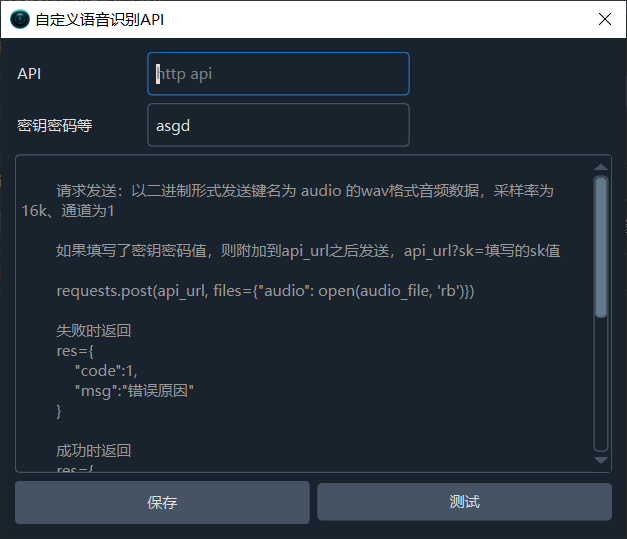
Parameter Description
| Parameter | Description |
|---|---|
| API Address | Your API endpoint address, must start with http |
| API Key | If authentication is required, enter it here. The key is appended to the API address as ?sk=key_value |
API Request Format
pyVideoTrans sends a POST request to the API address you entered:
requests.post(api_url, files={"audio": open(audio_file, 'rb')}, data={"language": "2-letter language code"})Request details:
| Item | Description |
|---|---|
| Method | POST |
| Audio data | Key name: audio, WAV format, 16kHz sample rate, mono |
| Language parameter | Key name: language, 2-letter code (e.g., zh, en) |
| Key delivery | Appended to URL: api_url?sk=your_key_value |
API Response Format
Your API must return JSON format data.
Success response:
{
    "code": 0,
    "data": "SRT format subtitle string"
}Failure response:
{
    "code": 1,
    "msg": "Error reason"
}The
datafield can be an SRT format string, or an array containingtimeandtextfields.
Built-in Service Integration
Gladia Cloud Recognition
When the API address contains api.gladia.io, the program automatically switches to Gladia integration mode:
- Upload the audio to Gladia's server
- Initiate a transcription request
- Poll for transcription results
- Return SRT format subtitles
Steps:
- Register at https://gladia.io/ and obtain an API Key
- In pyVideoTrans's Custom Speech Recognition API settings:
- API address:
https://api.gladia.io - API key: Your Gladia API Key
- API address:
- Save and use
VibeVoice ASR (with Speaker Diarization)
When the API key contains vibevoice-asr, the program automatically switches to VibeVoice ASR integration mode:
- Uses the
gradio_clientlibrary to connect to the VibeVoice service - Automatically segments long audio into 60-minute chunks
- Supports speaker diarization — recognition results automatically include speaker labels
- Speaker information is saved to
speaker.jsonin the cache folder
Steps:
- Deploy and start the VibeVoice ASR service
- In pyVideoTrans's Custom Speech Recognition API settings:
- API address: VibeVoice service's Gradio address (e.g.,
http://127.0.0.1:7860) - API key:
vibevoice-asr(including this string triggers the special mode)
- API address: VibeVoice service's Gradio address (e.g.,
- Save and use
Best Practices
| Setting | Recommended Value | Notes |
|---|---|---|
| Audio format | WAV 16kHz mono | Best recognition results; auto-converted by the program |
| API address | Must start with http | Ensure the address is complete and accessible |
| Retry mechanism | Default: 2 times | Auto-retries on network instability |
| Language | Specify explicitly | More accurate than auto-detection |
Self-hosted API Example
If you need to build your own API service, here's a simple Flask example:
from flask import Flask, request, jsonify

app = Flask(__name__)

@app.route('/recognize', methods=['POST'])
def recognize():
    audio_file = request.files['audio']
    language = request.form.get('language', 'zh')

    # Call your speech recognition model here
    # result = your_model.recognize(audio_file, language)

    # Return SRT format string
    srt_content = "1\n00:00:00,000 --> 00:00:05,000\nThis is the recognition result\n"

    return jsonify({
        "code": 0,
        "data": srt_content
    })

if __name__ == '__main__':
app.run(host='0.0.0.0', port=5000)FAQ
Q: Connection failed after entering the address?
A: Check:
- Does the API address start with
httporhttps? - Is the API service running?
- Is the port correct? Is the firewall allowing the connection?
Q: Incorrect data format returned?
A: Ensure your API returns standard JSON format with code and data (or msg) fields. Refer to the response format specification above.
Q: How to use the Gladia service?
A: Enter https://api.gladia.io as the API address and your Gladia API Key as the API key. The program will automatically detect and switch to Gladia integration mode. See the Gladia Tutorial for details.
Q: Speaker diarization not working?
A: Ensure the API key contains the vibevoice-asr string and the VibeVoice ASR service is running. Speaker diarization requires server-side support.
Q: Audio recognition results are empty?
A: Check that the audio format is WAV 16kHz mono. Although the program will attempt automatic conversion, pre-processing the audio to standard format is recommended for best results.