
Error Analysis and Solution for paraformer-zh is not registered
Error Analysis and Solution for SenseVoiceSmall is not registered
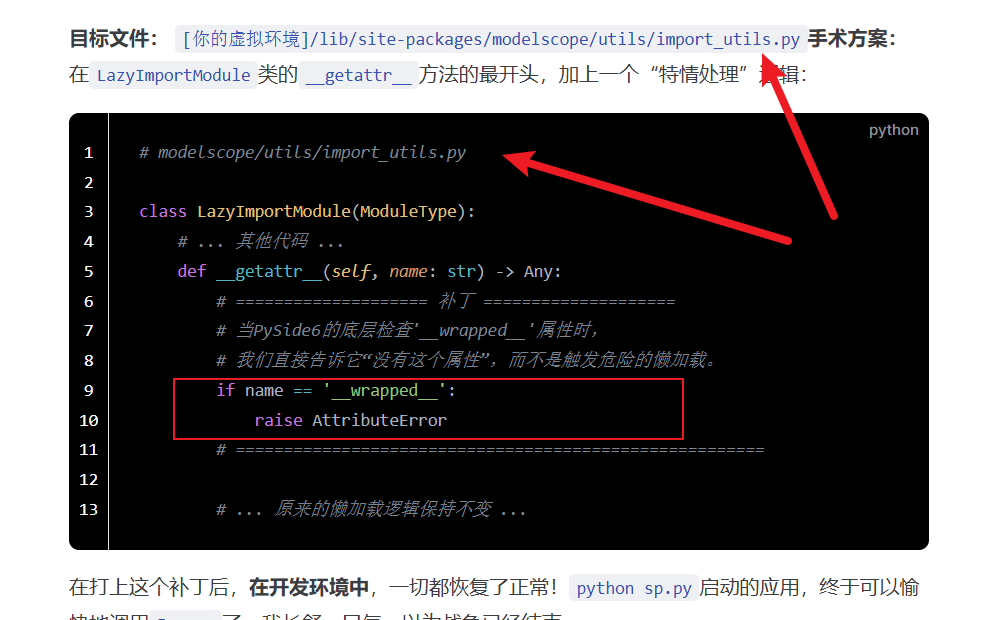
In short, it's a conflict between an internal self-check behavior of PySide6 and the lazy loading mechanism of ModelScope. The solution requires modifying the ModelScope source code, as shown in the image below. For the specific reasons and explanation, please read this article.
After performing an operation in the PySide6 interface, Funasr is called for speech recognition.
- Running in a separate test script? Everything works perfectly, smooth as silk.
- Calling it by clicking a button in the PySide6 application? The dreaded
xxx is not registerederror persists forever.
And it all started with a seemingly simple and harmless error message.
The Error paraformer-zh is not registered
Initially, the error thrown by the console was: AssertionError: paraformer-zh is not registered
Similarly, if you are using
sensevoicesmall, you will encounter the same error:SenseVoiceSmall is not registered.
As an experienced developer, my first instinct was: this must be an issue with the model registration step. In frameworks like Funasr and ModelScope, models need to be "registered" to a global list before use. This error clearly meant that when AutoModel(model='paraformer-zh') was called, it didn't recognize the name 'paraformer-zh'.
Why wouldn't it recognize it in the PySide6 environment? A series of "usual suspects" flashed through my mind:
- Wrong Python environment?
sys.executableandsys.pathprinted identical results. Ruled out. - Changed working directory?
os.getcwd()also showed normal. Ruled out. - Missing dependencies? Repeatedly checked and reinstalled; dependencies were complete. Ruled out.
My intuition told me the problem was deeper. The GUI application's event loop and complex runtime environment must have altered the code's behavior somewhere.
Process Isolation – The Right Direction, Wrong Depth
To escape the potential "pollution" from the PySide6 main thread, I deployed the standard weapon: multiprocessing. I placed the entire recognition logic into a separate function and launched a brand-new process to execute it using the spawn context. I was confident that a clean, isolated process should finally work, right?
Yet, the same error appeared again.
This made me ponder. While multiprocessing creates a new process, it still has intricate connections with the main process to pass data and objects between processes. The child process, upon startup, still imports certain modules from my project, which in turn depend on PySide6. Perhaps this "pollution" was happening at a more fundamental level.
So, I switched to the more isolated subprocess (implemented as QProcess in PySide6). I created a "self-calling" architecture: my main program sp.py could launch a pure "computation worker" mode via a special command-line argument --worker-mode.
This approach finally changed the error message! It was like seeing a glimmer of light after walking in a dark tunnel for so long.
Cannot import __wrapped__ – The Truth Emerges
The new error log pointed directly at ModelScope's lazy loading mechanism: ImportError: Cannot import available module of __wrapped__ in modelscope...
After arduous tracing, and even considering modifying ModelScope's __init__.py to "disable" lazy loading (a dead-end path leading to circular import hell, don't try it!), I finally found the crime scene in a long call stack:
File "shibokensupport/signature/loader.py", ...
File "inspect.py", ... in _is_wrapper
    return hasattr(f, '__wrapped__')
File "modelscope/utils/import_utils.py", ... in __getattr__
ImportError: Cannot import available module of __wrapped__...The real culprit was PySide6 itself!
Let me translate this "forensic report":
shibokensupportis a low-level support module for PySide6. When my worker process started and importedmodelscope, even though it didn't create any windows, certain "ghost" modules of PySide6 were still active in the background.- This "ghost" module, with "good intentions," wanted to check if the newly imported
modelscopemodule was an object wrapped by PySide6. - Its checking method was very standard: using Python's built-in
inspectlibrary to ask:hasattr(modelscope, '__wrapped__')("Do you have the__wrapped__attribute?"). - This question happened to hit
ModelScope's sore spot. To implement lazy loading,ModelScopeuses a specialLazyImportModuleobject that masquerades as themodelscopemodule itself. This object intercepts all attribute access. - When
LazyImportModulewas asked about__wrapped__, its__getattr__method was triggered. It mistakenly thought this was a normal request and tried to import a module named__wrapped__from libraries liketransformers– which, of course, doesn't exist. Thus, it threw the fatalImportError.
Conclusion: An innocuous internal self-check behavior of PySide6 and ModelScope's clever but fragile lazy loading mechanism had an unexpected, catastrophic chemical reaction.
Final Solution: Modify the ModelScope Source Code
Now that the root cause was identified, the solution became exceptionally clear. We can't stop PySide6 from performing its check, but we can "teach" ModelScope how to correctly respond to this check. We only need to make one tiny, surgical modification to the ModelScope source code.
Target File: [Your Virtual Environment]/lib/site-packages/modelscope/utils/import_utils.pySurgery Plan: Add a "special case handling" logic at the very beginning of the __getattr__ method in the LazyImportModule class:
# modelscope/utils/import_utils.py

class LazyImportModule(ModuleType):
    # ... other code ...
    def __getattr__(self, name: str) -> Any:
        # ==================== PATCH ====================
        # When PySide6's underlying layer checks for the '__wrapped__' attribute,
        # we directly tell it "this attribute does not exist," instead of triggering the dangerous lazy loading.
        if name == '__wrapped__':
            raise AttributeError
        # =======================================================

# ... the original lazy loading logic remains unchanged ...After applying this patch, in the development environment, everything returned to normal! The application launched with python sp.py could finally happily call Funasr.