
Zhipu AI Translation Channel
What is it?
Zhipu AI (智谱 AI, also known as Zhipu) is a leading AI platform that provides the GLM series of models. Since version 3.74, pyVideoTrans has integrated Zhipu AI as a standalone translation channel. Additionally, Zhipu AI supports speech recognition (GLM-ASR) and dubbing (GLM-TTS).
Prerequisites
- pyVideoTrans v3.74 or higher (for translation)
- pyVideoTrans v3.93 or higher (for speech recognition and dubbing)
- A Zhipu AI platform account (to obtain an API key)
How to Get an API Key
Step 1: Sign up and log in to Zhipu AI
Go to https://www.bigmodel.cn and register with your phone number or email.
Step 2: Create an API Key
- After logging in, visit https://www.bigmodel.cn/usercenter/apikeys
- Click "Create API Key"
- Give the key a name
- Copy the generated API key and save it
Step 3: Claim free credits
Zhipu AI provides free credits for new users. Check your balance on the platform homepage.
Configuring Translation in pyVideoTrans
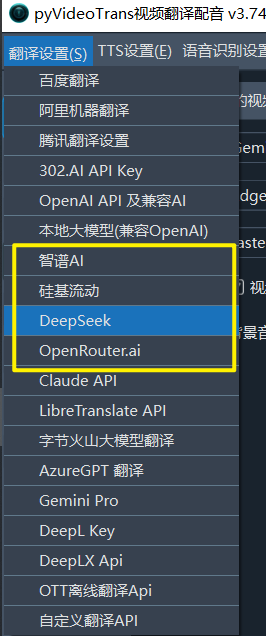
- Open the menu bar → Translation Settings → Zhipu AI Settings
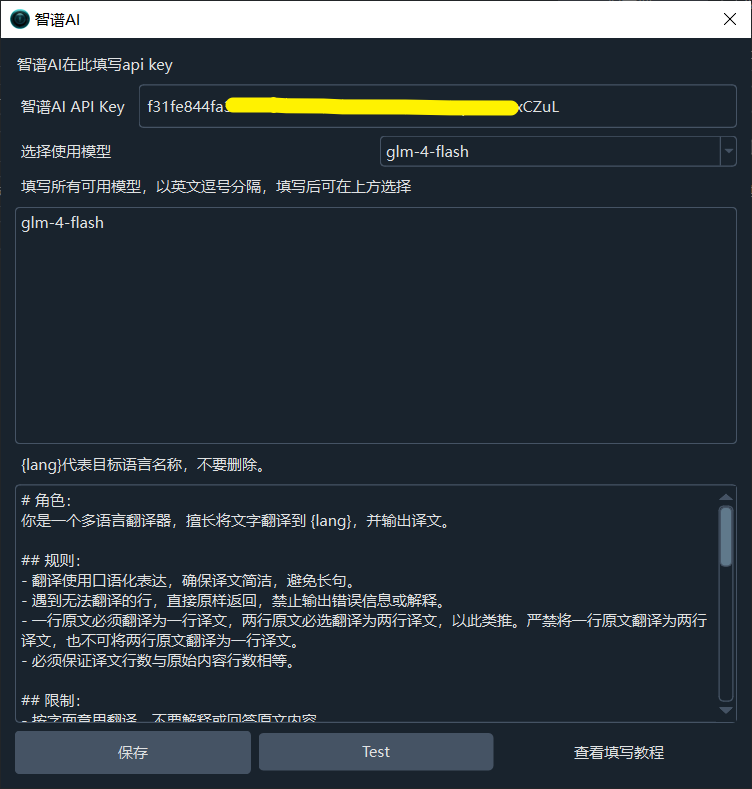
- Enter the API key from Zhipu AI in the API KEY field
- Select a model from the dropdown —
glm-4-flashis recommended (free, fast), or manually enter other Zhipu AI model names - Click the Test button to verify the connection
- Save after a successful test
Using Speech Recognition (GLM-ASR)
Starting from v3.93, a new speech recognition channel is available: Zhipu AI GLM-ASR.
- Enter your API key in Translation Settings → Zhipu AI
- Select the speech recognition model
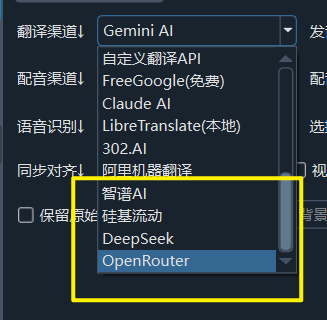
glm-asr-2512 - On the main interface, select Zhipu AI GLM-ASR as the speech recognition channel
- Supports speech recognition in 10+ languages
Using Dubbing (GLM-TTS)
Starting from v3.93, a new dubbing channel is available: Zhipu AI GLM-TTS.
- Enter your API key in Translation Settings → Zhipu AI
- On the main interface, select Zhipu AI GLM-TTS as the dubbing channel
- Uses the
glm-ttsmodel for dubbing
Note: Default dubbing includes a "beep" watermark sound. To disable it, go to: Personal Center → Security Management → Watermark Management: https://www.bigmodel.cn/usercenter/safety-mgmt/watermark
Recommended Configuration
| Setting | Recommended Value |
|---|---|
| API URL | https://open.bigmodel.cn/api/paas/v4/ (default, no changes needed) |
| API Key | Obtained from Zhipu AI platform |
| Translation Model | glm-4-flash (free, fast) or glm-4.5-flash |
| Max Output Tokens | 4095 (default) |
Troubleshooting
| Issue | Cause | Solution |
|---|---|---|
| "Authentication Error" | API key incorrect | Log in to Zhipu AI and generate a new key |
| Dubbing has "beep" watermark | Watermark not disabled | Disable it at https://www.bigmodel.cn/usercenter/safety-mgmt/watermark |
| Speech recognition unavailable | Version too low | Upgrade to v3.93 or higher |
| Connection timeout | Network issue | Check your network connection |
| Rate limit errors | Too many requests | Increase the post-translation pause time |