
LibreTranslate Translation Channel
What is it?
LibreTranslate is a free and open-source machine translation API with self-hosting and offline support. You have two options:
- Use the official paid API: Quick and easy, no deployment needed
- Self-host locally: Completely free, fully private, but requires some technical knowledge
Prerequisites
- pyVideoTrans v3.00 or higher
- Option 1: LibreTranslate official API key (paid)
- Option 2: A locally deployed LibreTranslate service
Option 1: Using the LibreTranslate Official API
Step 1: Get an API Key
- Visit https://portal.libretranslate.com/ and register/log in
- Purchase an API key (free trial credits available)
- Copy the API key
Step 2: Configure in pyVideoTrans
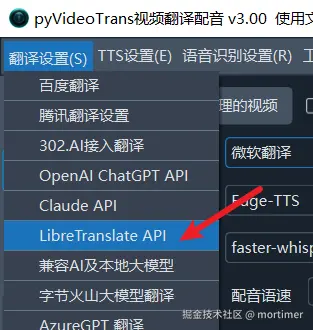
- Open the menu bar → Translation Settings → LibreTranslate API
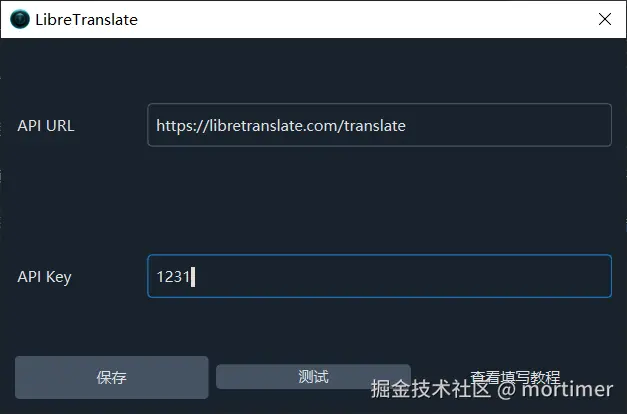
- In the API URL field, enter:
https://libretranslate.com/translate - Enter your purchased API key in the API Key field
- Click the Test button to verify the connection
- Save after a successful test
Option 2: Self-Hosting Locally
Quick Deploy (Docker)
If you have Docker installed, you can start it with a single command:
bash
docker run -ti --rm -p 5000:5000 libretranslate/libretranslateOnce running, enter http://127.0.0.1:5000 as the API URL in pyVideoTrans.
Manual Deployment
Refer to the official LibreTranslate documentation: https://github.com/LibreTranslate/LibreTranslate?tab=readme-ov-file#install-and-run
Recommended Configuration
| Setting | Official API | Local Deployment |
|---|---|---|
| API URL | https://libretranslate.com/translate | http://127.0.0.1:5000 |
| API Key | Purchased from LibreTranslate | Leave empty (not needed by default) |
Supported Languages
LibreTranslate supports translation between 50+ languages. Full list: https://libretranslate.com/languages
Related Links
- Source code: https://github.com/LibreTranslate/LibreTranslate
- Official API service: https://libretranslate.com/
- Purchase API key: https://portal.libretranslate.com/
- Supported languages: https://libretranslate.com/languages
Troubleshooting
| Issue | Cause | Solution |
|---|---|---|
| Connection failed | Local service not running | Make sure LibreTranslate is running |
| "API Key required" | Using official API without entering a key | Enter a valid API key |
| Slow translation speed | Insufficient hardware resources for local deployment | Use a machine with more memory, or use the official API |
| Certain languages not supported | Language not in the supported list | Check the official language list for support |