
edgeTTS Voice Channel
What is it?
edgeTTS is a free text-to-speech service from Microsoft, built on the speech synthesis technology used in Edge browser. No registration, no API key, no payment required. It supports many languages worldwide, with at least 2 voice options per language.
Advantages:
- Completely free, no account needed
- No proxy or VPN required — works directly from anywhere
- Supports all languages
- Stable and reliable voice quality
- High concurrency support (default: 10 concurrent requests)
How to Use
Step 1: Select the Voice Channel
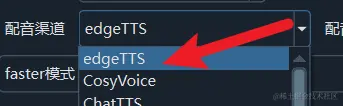
In the Voice Channel dropdown on the main interface, select edgeTTS.
Step 2: Select the Target Language
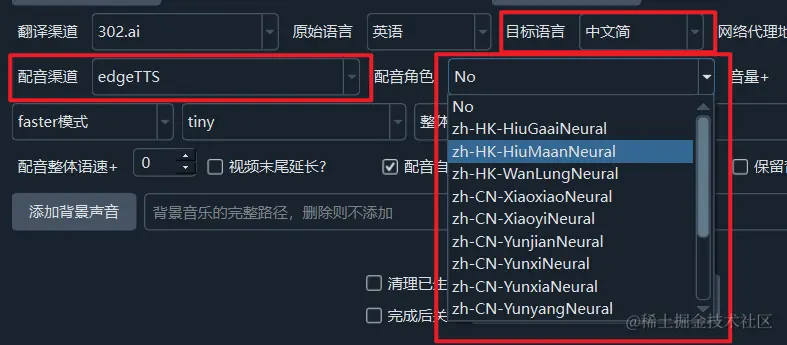
In the Target Language dropdown, choose your desired language (e.g., English, Japanese, Korean, etc.).
Step 3: Select a Voice
After selecting the target language, the Voice dropdown will automatically load all available voices for that language. Click the play button next to a voice name to preview it, then select the one you like.
Step 4: Start Dubbing
Once configured, click the dubbing button to begin. No additional setup is needed.
Advanced Settings
Adjusting Speed and Pitch
edgeTTS supports adjusting speech rate and pitch in Advanced Options:
- Speed: Positive values speed up, negative values slow down (e.g.,
+20%for 20% faster) - Pitch: Positive values raise pitch, negative values lower it
Bypassing Proxy
If you use a system proxy and edgeTTS has connection issues, create an empty file named edgetts-noproxy.txt in the software's root directory. edgeTTS will bypass the proxy and connect directly.
Concurrency and Retries
Default concurrency is 10 with 3 retries. If you encounter rate-limiting timeouts, try reducing the concurrency.
Troubleshooting
| Issue | Solution |
|---|---|
| "Connection refused" or timeout | Check your network connection; if using a proxy, try creating the edgetts-noproxy.txt file |
| "NoAudioReceived" error | Microsoft may be rate-limiting — wait a few minutes and retry |
| Some voices unavailable | Some voices may have been retired by Microsoft — try a different one |
| Audio quality not great | edgeTTS uses synthetic speech with fixed quality; for higher quality, consider AzureTTS or ElevenLabs |