
Dubbing & TTS Channels
Dubbing (TTS) is the third step in video translation. It converts translated subtitle text into speech audio. pyVideoTrans supports 30+ dubbing channels.
You can also use the dubbing feature independently via the left panel:
Batch Dub Subtitles. It supports importing multiple SRT subtitle files or TXT files.The
clonevoice role uses the speaker's original voice timbre from the video to perform voice cloning. This role is only available in the main interface'sVideo Translationfeature.All channels that support the
clonerole also support custom reference audio. This allows you to clone a voice from a 3–10 second audio clip you provide. See Create and Use Reference Audio below for details.
Ready to Use (Free)
No complex configuration required—ideal for beginners.
| Channel | Description | Rating |
|---|---|---|
| Edge-TTS(Free) | Microsoft's free service, natural voices, supports all languages | ⭐⭐⭐ Default Recommended |
| gTTS(Free) | Google TTS, basic quality, requires a proxy in mainland China | ⭐⭐ |
⚠️ Heavy usage of Edge-TTS in a short period may trigger rate limiting. We recommend setting concurrency to 1 and pause duration to 5–10 seconds in Advanced Options.
Built-in (Free)
Models will be downloaded automatically upon first use.
| Channel | Description | GPU Acceleration | Supports Cloning (clone role) | Rating |
|---|---|---|---|---|
| Qwen3-TTS(Built-in) | Supports Chinese, English, Japanese, Korean, German, French, Russian, Portuguese, Spanish, and Italian | ✅ | ✅ | ⭐⭐⭐ Recommended |
| F5-TTS(Built-in) | Chinese, English, Japanese, French, German, Russian, Italian, Spanish, Hindi, Arabic | ✅ | ✅ | ⭐⭐⭐ |
| OmniVoice-TTS | Supports 600+ languages (Built-in from v4.05) | ✅ | ✅ | ⭐⭐⭐ Recommended |
| Confucius-TTS(Built-in)from v4.06 | Chinese, English, Japanese, Korean, German, French, Spanish, Indonesian, Italian, Thai, Portuguese, Russian, Malay, Vietnamese | ✅ | ✅ | ⭐⭐⭐ |
| MOSS-TTS-Nano(Built-in) | Chinese, English, German, Spanish, French, Japanese, Italian, Hungarian, Korean, Russian, Persian, Arabic, Polish, Portuguese, Czech, Swedish, Greek, Turkish | ❌ | ✅ | ⭐⭐ |
| ZipVoice(Built-in) | Chinese and English | ✅ | ✅ | ⭐⭐⭐ Recommended |
| Piper(Built-in) | Lightweight, supports 20 languages | ❌ | ❌ | ⭐⭐ |
| ChatterBox(Built-in) | Arabic, German, Greek, English, Spanish, Finnish, French, Hebrew, Hindi, Italian, Japanese, Korean, Malay, Dutch, Norwegian, Polish, Portuguese, Russian, Swedish, Swahili, Turkish, Chinese | ✅ | ✅ | ⭐⭐⭐ Recommended |
| Supertonic3(Built-in) | English, Korean, Japanese, Arabic, Czech, German, Greek, Spanish, French, Hindi, Hungarian, Indonesian, Italian, Dutch, Polish, Portuguese, Romanian, Russian, Swedish, Turkish, Ukrainian, Vietnamese | ❌ | ❌ | ⭐⭐ |
| VITS(Built-in) | Chinese and English dubbing | ❌ | ❌ | ⭐⭐ |
| Higgs-audio-v3(Built-in) | All built-in languages; CPU-only requires 20GB RAM, GPU acceleration requires >10GB VRAM | ✅ | ✅ | ⭐⭐ |
Due to network conditions and large model sizes, automatic downloads might occasionally fail. If a download fails, click here to view model download links and manual setup instructions.
Self-Hosted / Local Deployment (Advanced)
| Channel | Description | Supports Cloning (clone role) | Rating |
|---|---|---|---|
| GPT-SoVITS | Supports Chinese, English, Japanese, Korean, Cantonese | ✅ | ⭐⭐⭐ Recommended |
| Index-TTS | Chinese, English | ✅ | ⭐⭐⭐ Recommended |
| VoxCPM-TTS | Arabic, Burmese, Chinese, Danish, Dutch, English, Finnish, French, German, Greek, Hebrew, Hindi, Indonesian, Italian, Japanese, Khmer, Korean, Lao, Malay, Norwegian, Polish, Portuguese, Russian, Spanish, Swahili, Swedish, Tagalog, Thai, Turkish, Vietnamese | ✅ | ⭐⭐⭐ |
| CosyVoice | Chinese, English, Japanese, Korean, German, Spanish, French, Italian, Russian | ✅ | ⭐⭐ |
| ChatTTS | Supports Chinese and English | — | ⭐⭐ |
| Fish-TTS | Supports all built-in languages | — | ⭐ |
| Kokoro-TTS | Chinese, English, Korean, Italian, Portuguese, German, French, Hindi | — | ⭐ |
| Spark-TTS | Chinese, English | ✅ | ⭐⭐ |
| clone-voice | No longer maintained | ✅ | ⭐ |
Create and Use Reference Audio
Any dubbing channel that supports voice cloning (where the role list includes
clone) can use reference audio. Once configured, simply select your reference audio as the voice role, and the software will automatically dub the audio using that voice timbre. Reference audio is configured underMenu → TTS Settings → Reference Audio Settings.
Step-by-Step Guide
- Record or trim a
3–10saudio clip from existing audio. Save it as a.wavfile, making sure the pronunciation is clear and free of background noise. - Open the
Menu → TTS Settings → Reference Audio Settingswindow. - Enter your reference audio info in the text box using the following format:
audio_filename#matching_text_content- Place the reference audio file inside the
pyVideoTrans_folder/f5-ttsfolder (create this folder manually if it doesn't exist).
Example
Suppose you have an audio file named nverguo.wav, and the spoken words in that audio are "The text content corresponding to the audio". You would enter:
nverguo.wav#The text content corresponding to the audio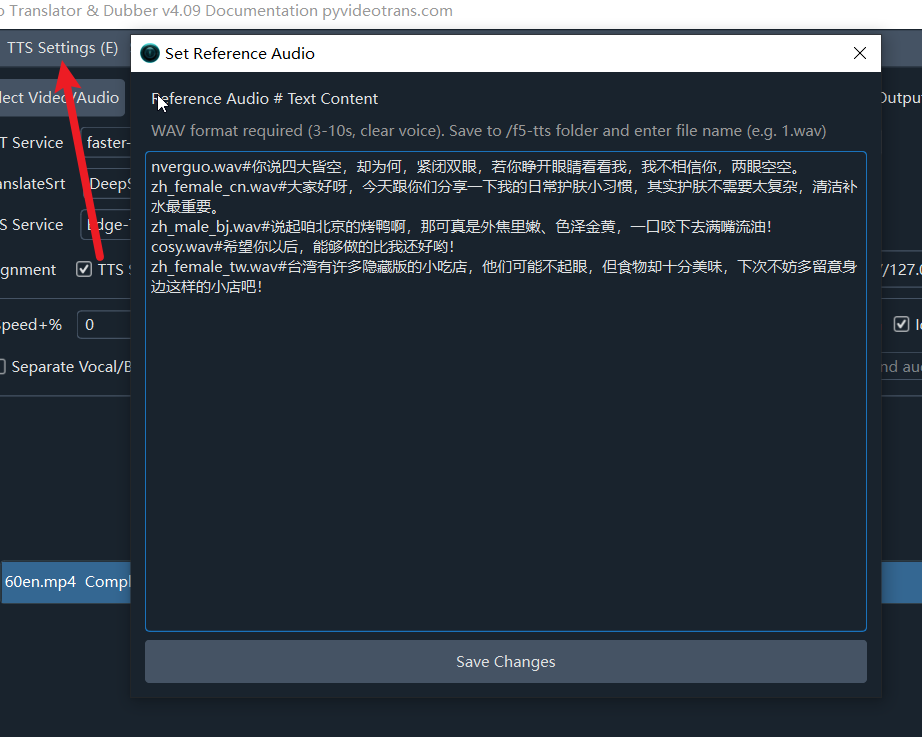
Reference Audio Requirements
| Item | Requirement |
|---|---|
| Format | WAV format (recommended); MP3 and other common formats are also supported |
| Duration | 3–10 seconds |
| Audio Quality | Clear speech, no background noise |
| Text | Must match the spoken words in the audio exactly |
Professional Cloud Services (API Key Required)
| Channel | Description | Rating |
|---|---|---|
| Azure TTS | Microsoft's enterprise-grade voice service | ⭐⭐⭐ |
| OpenAI TTS | Industry-leading audio technology | ⭐⭐⭐ |
| ByteDance TTS 2.0 | Authentic Chinese pronunciation | ⭐⭐⭐ |
| Alibaba Qwen-TTS | Alibaba Cloud text-to-speech | ⭐⭐⭐ |
| Gemini TTS | Google TTS | ⭐⭐ |
| Elevenlabs.io | High-end AI voice generation | ⭐⭐⭐ |
| 302.AI | API aggregation platform | ⭐⭐ |
| Minimaxi | MiniMax TTS (requires paid balance) | ⭐⭐ |
| Xiaomi TTS | Xiaomi AI Open Platform | ⭐⭐ |
| X.AI TTS | x.ai platform | ⭐⭐ |