
faster-whisper (Local) Speech Recognition
Overview
faster-whisper is a CTranslate2 implementation based on OpenAI's open-source Whisper model. As the name suggests, it delivers faster recognition speed without sacrificing accuracy. It is the most commonly used local speech recognition channel in pyVideoTrans.
Key advantages:
- Runs entirely locally — audio files are never uploaded to the internet, protecting your privacy
- Fast recognition speed, multiple times faster than the original OpenAI Whisper
- Supports many languages with high accuracy
- Supports CUDA acceleration — significant speedup with an NVIDIA GPU
- Models are downloaded automatically from HuggingFace on first use, then fully available offline
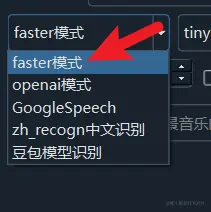
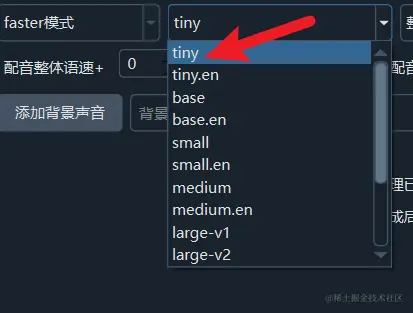
After selecting faster mode, you can choose the model to use on the right side. The first time you use a model, it will be downloaded online; afterward, speech recognition runs entirely locally without uploading your files.
Prerequisites
Before using faster-whisper, please confirm the following requirements:
| Requirement | Details |
|---|---|
| Disk space | At least 5–15 GB reserved for model files (larger models need more) |
| RAM | Basic models (tiny/base) require 4 GB+; large series requires 16 GB+ |
| GPU (optional) | NVIDIA GPU + CUDA acceleration provides significant speedup; large-v3 requires 10 GB+ VRAM |
| Network | Internet required on first use to download models; afterward, fully offline |
Model Selection
tiny --> base --> small --> medium --> large-v3-turbo --> large-v1 --> large-v2 --> large-v3
Models increase in size from left to right, with higher accuracy and greater memory/VRAM requirements.
It is recommended to use at least large-v3-turbo or larger. The best-performing model is large-v3.
Models ending with
.en(tiny.en,base.en,small.en,medium.en) and models starting withdistil(distil-large-v3,distil-large-v3.5) are for English-language audio only.
Model Reference Table
| Model | Use Case | RAM | VRAM (CUDA) | Notes |
|---|---|---|---|---|
| tiny / tiny.en | Quick preview | 2 GB+ | 1 GB+ | Fastest, lowest accuracy |
| base / base.en | Simple content | 3 GB+ | 1 GB+ | Good for clear speech |
| small / small.en | General use | 4 GB+ | 2 GB+ | Balanced speed and accuracy |
| medium / medium.en | Multilingual | 8 GB+ | 5 GB+ | Good multilingual performance |
| large-v3-turbo | Recommended starting point | 10 GB+ | 6 GB+ | Fast with high accuracy |
| large-v1 | High accuracy | 16 GB+ | 10 GB+ | Classic large model |
| large-v2 | High accuracy | 16 GB+ | 10 GB+ | Improved large model |
| large-v3 | Best results | 16 GB+ | 10 GB+ | Recommended — best overall |
Optimal Configuration
For the best speech recognition results, follow these settings:
- Select model
large-v3(ensure your system has more than 16 GB RAM or more than 10 GB VRAM). If requirements aren't met, trylarge-v1orlarge-v3-turbo. - Explicitly set the speech language to match the language spoken in the video.
- In Menu → Tools → Advanced Options → Speech Recognition Parameters: set
Minimum speech duration (ms)to 1000,Maximum speech duration (s)to 5 or higher, and do not checkWhisper pre-split audio.
Important for voice cloning: If you plan to dub with the
clonerole (cloning the original speaker's voice), it is strongly recommended to setMinimum speech duration (ms)to 3000 andMaximum speech duration (s)to 10. This is because voice cloning uses the original audio segment corresponding to the subtitle duration as a reference, and most dubbing channels require this reference audio to be 3–10 seconds long — otherwise dubbing will likely fail. You should also checkWhisper pre-split audioandMerge short subtitles into adjacentto ensure subtitle durations fall within the 3–10 second range.
- If the original speech is unclear or has background noise, enable Noise Reduction.
- If you are not using the
clonerole and want shorter subtitles (e.g., for vertical video), you can lowerMaximum speech duration (s)to 3 or 2. If dubbing is enabled, you can also checkSecondary recognition.
Secondary recognition: When dubbing is enabled and embedded single subtitles are selected, checking this option means the software will re-transcribe the dubbed audio after dubbing is complete, generating shorter subtitles embedded in the video to ensure precise alignment between subtitles and dubbed audio.
CUDA Acceleration
To speed up processing, on Windows and Linux, if you have an NVIDIA GPU, you can install the CUDA and cuDNN environment and enable CUDA Acceleration in the software, which significantly improves execution speed.

View CUDA and cuDNN installation tutorial
Manual Model Download
By default, models are downloaded automatically online the first time you use them. The original models are hosted on huggingface.co or its mirror hf-mirror.com. Due to large model sizes and potential network issues, you may encounter download failures or incomplete downloads. Use the following steps to download manually.
Manual Download — General Steps
- In the
modelsfolder inside thesp.exe(orsp.py) directory, create the corresponding model folder (folder names are listed in the tables below) - Open the corresponding HuggingFace download link
- Download all
.json,.bin, and.txtfiles from that page and place them in the folder you created. You can overwrite existing files.
Multilingual Model Download Links
| Model | Folder Name | HuggingFace Link |
|---|---|---|
| tiny | models--Systran--faster-whisper-tiny | https://huggingface.co/Systran/faster-whisper-tiny/tree/main |
| base | models--Systran--faster-whisper-base | https://huggingface.co/Systran/faster-whisper-base/tree/main |
| small | models--Systran--faster-whisper-small | https://huggingface.co/Systran/faster-whisper-small/tree/main |
| medium | models--Systran--faster-whisper-medium | https://huggingface.co/Systran/faster-whisper-medium/tree/main |
| large-v1 | models--Systran--faster-whisper-large-v1 | https://huggingface.co/Systran/faster-whisper-large-v1/tree/main |
| large-v2 | models--Systran--faster-whisper-large-v2 | https://huggingface.co/Systran/faster-whisper-large-v2/tree/main |
| large-v3 | models--Systran--faster-whisper-large-v3 | https://huggingface.co/Systran/faster-whisper-large-v3/tree/main |
| large-v3-turbo | models--mobiuslabsgmbh--faster-whisper-large-v3-turbo | https://huggingface.co/mobiuslabsgmbh/faster-whisper-large-v3-turbo/tree/main |
English-Only Model Download Links
These models can only be used for English-language audio/video.
| Model | Folder Name | HuggingFace Link |
|---|---|---|
| tiny.en | models--Systran--faster-whisper-tiny.en | https://huggingface.co/Systran/faster-whisper-tiny.en/tree/main |
| base.en | models--Systran--faster-whisper-base.en | https://huggingface.co/Systran/faster-whisper-base.en/tree/main |
| small.en | models--Systran--faster-whisper-small.en | https://huggingface.co/Systran/faster-whisper-small.en/tree/main |
| medium.en | models--Systran--faster-whisper-medium.en | https://huggingface.co/Systran/faster-whisper-medium.en/tree/main |
Distilled Model Download Links (English Only)
These distilled models can only be used for English-language audio/video.
| Model | Folder Name | HuggingFace Link |
|---|---|---|
| distil-large-v2 | models--Systran--faster-distil-whisper-large-v2 | https://huggingface.co/Systran/faster-distil-whisper-large-v2/tree/main |
| distil-large-v3 | models--Systran--faster-distil-whisper-large-v3 | https://huggingface.co/Systran/faster-distil-whisper-large-v3/tree/main |
| distil-large-v3.5 | models--distil-whisper--distil-large-v3.5-ct2 | https://huggingface.co/distil-whisper/distil-large-v3.5-ct2/tree/main |
| distil-small.en | models--Systran--faster-distil-whisper-small.en | https://huggingface.co/Systran/faster-distil-whisper-small.en/tree/main |
| distil-medium.en | models--Systran--faster-distil-whisper-medium.en | https://huggingface.co/Systran/faster-distil-whisper-medium.en/tree/main |
Using Mirror Sites
If HuggingFace download speeds are slow or inaccessible, you can use a mirror site. Simply replace huggingface.co with hf-mirror.com in the download URLs, for example:
- Original:
https://huggingface.co/Systran/faster-whisper-large-v3/tree/main - Mirror:
https://hf-mirror.com/Systran/faster-whisper-large-v3/tree/main
Common Issues and Troubleshooting
Download fails or gets stuck
Cause: Unstable network or inability to access HuggingFace.
Solutions:
- Use a mirror site (replace
huggingface.cowithhf-mirror.com) - Download model files manually — see the "Manual Model Download" section above
- Verify your proxy settings are configured correctly
Recognition results are blank or garbled
Cause: Model files downloaded incompletely or are corrupted.
Solutions:
- Delete the corresponding model folder in the
modelsdirectory and re-download - Verify that all
.json,.bin, and.txtfiles in the folder are complete
Recognition is very slow
Cause: CUDA acceleration is not enabled, or the model is too large.
Solutions:
- Confirm CUDA and cuDNN are installed, and enable
CUDA Accelerationin the software - If you don't have an NVIDIA GPU, try a smaller model (such as
baseorsmall) - Verify your GPU VRAM meets the model's requirements
Out of memory (OOM)
Cause: The model is too large for available RAM or VRAM.
Solutions:
- Use a smaller model (e.g.,
large-v3-turboinstead oflarge-v3) - Close other memory-intensive programs
- Ensure at least 16 GB RAM when using large-series models
Wrong language detected
Cause: The speech language was not correctly specified.
Solutions:
- Explicitly set the speech language in the software to match the language in the video
- If the video contains multiple languages, try processing in segments