
OpenAI TTS Voice Channel
What is it?
OpenAI TTS uses the TTS-1 model from ChatGPT for speech synthesis, delivering very natural and fluid voice output. It supports multiple voice styles and is ideal for users who need high voice quality.
Prerequisites:
- A paid OpenAI account
- Account must have TTS-1 model access
- A valid API Key
Step 1: Get an API Key
- Visit the OpenAI website and log in with your paid account
- Go to the API Keys page (left menu → API Keys)
- Click "Create new secret key" to generate a new API Key
- Copy and save it immediately — the key is only shown once
Step 2: Configure the Software
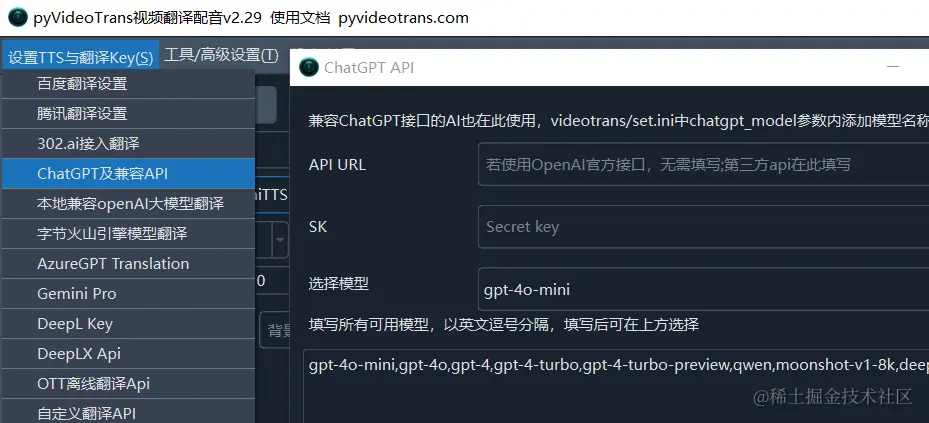
- Open the software and go to Menu → Settings → ChatGPT and Compatible APIs
- Fill in the following:
- API URL: Enter the OpenAI API address (usually
https://api.openai.com/v1) - API Key: Paste the key you just copied
- Model: Select
tts-1ortts-1-hd
- API URL: Enter the OpenAI API address (usually
- Click the test button to verify the connection
Step 3: Select a Voice
After configuration, return to the main interface:
- Select
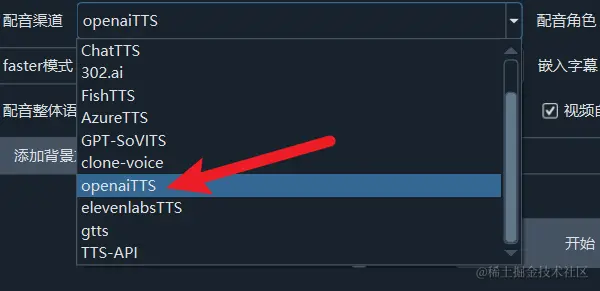
OpenAI TTSfrom the Voice Channel dropdown - Choose a voice from the Voice dropdown
- Click the play button to preview

Available Voices
OpenAI TTS provides the following standard voices:
- alloy - Neutral voice
- echo - Male voice
- fable - British accent
- onyx - Deep male voice
- nova - Female voice
- shimmer - Soft female voice
Important Notes
- TTS-1 is billed per character — keep usage costs in mind
- "Insufficient balance" errors mean your account needs a top-up
- If using a relay/proxy API, enter the URL and Key in the appropriate fields
- If the API connection fails, check your network and verify the key is correct
Common Errors
| Error | Cause | Solution |
|---|---|---|
| Unable to connect to API | Network issue or incorrect URL | Check the API URL and network connection |
| Authentication error | Invalid or expired key | Regenerate the API Key |
| Insufficient balance | Account needs funding | Top up your OpenAI account |
| Permission denied | Account lacks TTS permissions | Confirm your account is paid and has TTS access |