Skip to content

The method for integrating F5-TTS with pyVideoTrans on this page is only applicable to pyVideoTrans versions after V3.66. Please ensure you are using the corresponding webui.py from the official open-source project.


Starting from v3.68, this interface can be used for F5-TTS / Spark-TTS / index-TTS / Dia-TTS / VoxCPM simultaneously. You only need to fill in the correct URL address (usually http://127.0.0.1:7860 on your local machine) and select the corresponding service from the dropdown list.

F5-TTS Windows Integrated Package:

For source code deployment methods, please refer to the official project documentation: https://github.com/SWivid/F5-TTS

index-tts Deployment Method

dia-1.6b Deployment Method

spark-tts Deployment Method

VoxCPM-tts Deployment Method


Configuration

To use TTS in the video translation software, you first need to start the corresponding TTS webui interface and keep the terminal window open.

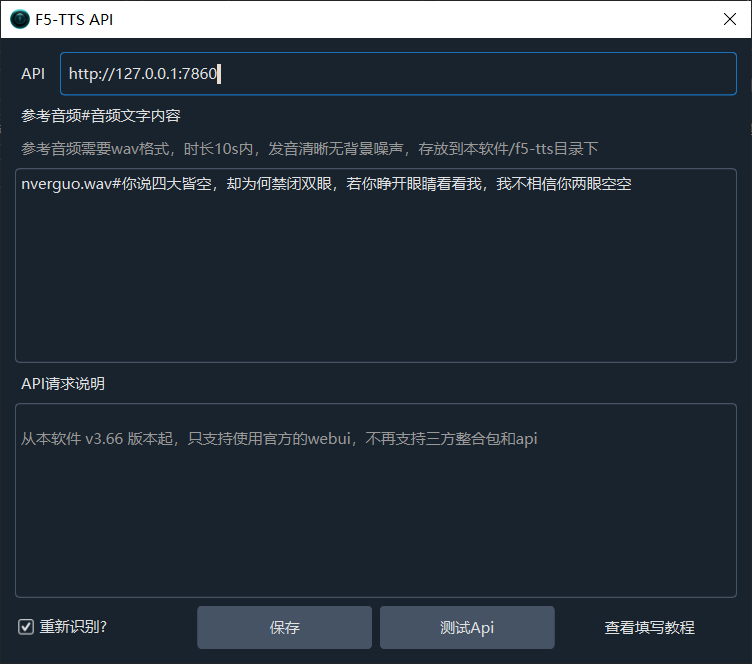
Then, on the configuration page, fill in the URL address, which defaults to http://127.0.0.1:7860. If your startup address is not the default, please fill it in according to the actual address.

In the "Reference Audio" field, fill in the following:

Name of the audio file you want to use#The corresponding text in that audio file

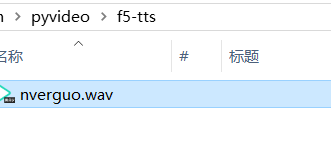
Note: Please place the reference audio file in the f5-tts folder within the root directory of the pyVideotrans project. If the folder does not exist, please create it manually. For example, you can name the reference audio file nverguo.wav.

Place the reference audio file in the f5-tts folder inside the pyVideotrans software, don't get it wrong

Example of how to fill it in:

Reference audio and the text within the reference audio

Click to view Spark-TTS source code deployment methodClick to view index-TTS source code deployment methodClick to view Dia-1.6b source code deployment methodClick to view VoxCPM integrated package

Adding Other Languages

If you need to use models for other languages, you also need to modify the F5-TTS project directory/src/f5_tts/infer/infer_gradio.py file.

Find the code around line 59:

python
DEFAULT_TTS_MODEL_CFG = [
    "hf://SWivid/F5-TTS/F5TTS_v1_Base/model_1250000.safetensors",
    "hf://SWivid/F5-TTS/F5TTS_v1_Base/vocab.txt",
    json.dumps(dict(dim=1024, depth=22, heads=16, ff_mult=2, text_dim=512, conv_layers=4)),
]

Diagram of the code location:

By default, this configures the official Chinese and English models. If you need to use models for other languages, please modify it according to the instructions below. After modification, you need to restart F5-TTS and ensure you have configured a scientific internet access environment so the program can download the new language model online. After successful download, first test by cloning a voice through the WebUI, and then use it through pyVideoTrans.

Important: Before use, ensure the dubbing text language in pyVideoTrans matches the model language selected in F5-TTS.

Here are the configuration details for each language model:

  1. French:

    python
    DEFAULT_TTS_MODEL_CFG = [
        "hf://RASPIAUDIO/F5-French-MixedSpeakers-reduced/model_last_reduced.pt",
        "hf://RASPIAUDIO/F5-French-MixedSpeakers-reduced/vocab.txt",
        json.dumps({"dim": 1024, "depth": 22, "heads": 16, "ff_mult": 2, "text_dim": 512, "text_mask_padding": False, "conv_layers": 4, "pe_attn_head": 1}),
    ]
  2. Hindi:

    python
    DEFAULT_TTS_MODEL_CFG = [
        "hf://SPRINGLab/F5-Hindi-24KHz/model_2500000.safetensors",
        "hf://SPRINGLab/F5-Hindi-24KHz/vocab.txt",
        json.dumps({"dim": 768, "depth": 18, "heads": 12, "ff_mult": 2, "text_dim": 512, "text_mask_padding": False, "conv_layers": 4, "pe_attn_head": 1})
    ]
  3. Italian:

    python
    DEFAULT_TTS_MODEL_CFG = [
        "hf://alien79/F5-TTS-italian/model_159600.safetensors",
        "hf://alien79/F5-TTS-italian/vocab.txt",
        json.dumps({"dim": 1024, "depth": 22, "heads": 16, "ff_mult": 2, "text_dim": 512, "text_mask_padding": False, "conv_layers": 4, "pe_attn_head": 1})
    ]
  4. Japanese:

    python
    DEFAULT_TTS_MODEL_CFG = [
        "hf://Jmica/F5TTS/JA_25498980/model_25498980.pt",
        "hf://Jmica/F5TTS/JA_25498980/vocab_updated.txt",
        json.dumps({"dim": 1024, "depth": 22, "heads": 16, "ff_mult": 2, "text_dim": 512, "text_mask_padding": False, "conv_layers": 4, "pe_attn_head": 1})
    ]
  5. Russian:

    python
    DEFAULT_TTS_MODEL_CFG = [
        "hf://hotstone228/F5-TTS-Russian/model_last.safetensors",
        "hf://hotstone228/F5-TTS-Russian/vocab.txt",
        json.dumps({"dim": 1024, "depth": 22, "heads": 16, "ff_mult": 2, "text_dim": 512, "text_mask_padding": False, "conv_layers": 4, "pe_attn_head": 1})
    ]
  6. Spanish:

    python
    DEFAULT_TTS_MODEL_CFG = [
        "hf://jpgallegoar/F5-Spanish/model_last.safetensors",
        "hf://jpgallegoar/F5-Spanish/vocab.txt",
        json.dumps({"dim": 1024, "depth": 22, "heads": 16, "ff_mult": 2, "text_dim": 512, "conv_layers": 4})
    ]
  7. Finnish:

    python
       DEFAULT_TTS_MODEL_CFG = [
        "hf://AsmoKoskinen/F5-TTS_Finnish_Model/model_common_voice_fi_vox_populi_fi_20241206.safetensors",
        "hf://AsmoKoskinen/F5-TTS_Finnish_Model/vocab.txt",
        json.dumps({"dim": 1024, "depth": 22, "heads": 16, "ff_mult": 2, "text_dim": 512, "text_mask_padding": False, "conv_layers": 4, "pe_attn_head": 1})]

You can follow official updates. Other languages can be added in a similar way. Address: https://github.com/SWivid/F5-TTS/blob/main/src/f5_tts/infer/SHARED.md

Common Errors and Precautions

  1. During API usage, you can close the WebUI interface in the browser, but you must not close the terminal window that started F5-TTS.

    This interface must not be closed, otherwise the API cannot be called

  2. Can I dynamically switch models in F5-TTS? No. You need to manually modify the code as described above and then restart the WebUI.

  3. Frequently encountering errors like this:

    raise ConnectTimeout(e, request=request)
requests.exceptions.ConnectTimeout: (MaxRetryError("HTTPSConnectionPool(host='huggingface.co', port=443): Max retries exceeded with url: /SWivid/F5-TTS/resolve/main/F5TTS_v1_Base/vocab.txt (Caused by ConnectTimeoutError(<urllib3.connection.HTTPSConnection object at 0x000002174796DF60>, 'Connection to huggingface.co timed out. (connect timeout=10)'))"), '(Request ID: 0458b571-90ab-4edd-ae59-b93bd603cdd0)')

This is a proxy issue. Please use a scientific internet access method and a stable proxy. Refer to the configuration above for setting up the scientific internet access environment.