
Improving AI Translation Quality
When using AI to translate SRT subtitles, the software offers two translation modes with different trade-offs. Choosing the right mode can significantly improve translation quality.
Two Translation Modes
Mode 1: Full SRT Translation (Recommended)
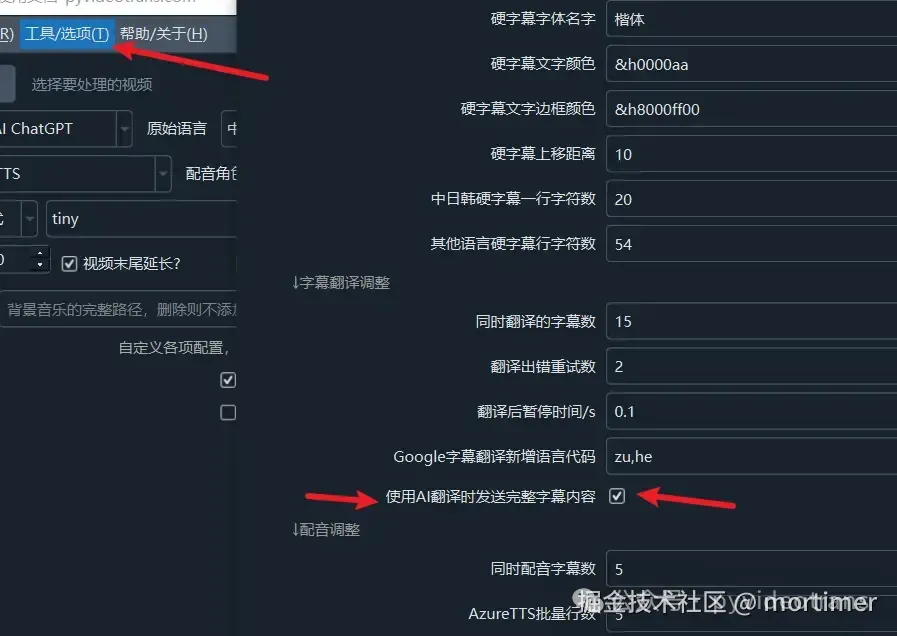
How to enable: Check Send SRT in the software interface.
The full SRT format (including line numbers, timestamps, and subtitle text) is sent to the AI model:
1
00:00:01,950 --> 00:00:04,950
Organic molecules discovered in the Five Elder Stars system.

2
00:00:04,950 --> 00:00:07,902
How far are we from third contact?

3
00:00:07,902 --> 00:00:11,958
The microwave observation mission has entered its anniversary.Pros: The AI has full context, resulting in better translation quality.
Cons:
- Consumes more tokens
- May cause SRT format corruption (e.g., punctuation symbols converted, line numbers merged with timestamps)
Note: This mode is only recommended for sufficiently capable models (e.g., GPT-4o-mini or larger). Locally deployed smaller models may produce garbled SRT output due to limited instruction-following ability.
Mode 2: Line-by-Line Text Translation
How to enable: Uncheck Send SRT in the software interface.
Only the plain subtitle text is sent to the AI:
Organic molecules discovered in the Five Elder Stars system.
How far are we from third contact?
The microwave observation mission has entered its anniversary.Pros: Guarantees valid SRT output format.
Cons: Translating line by line loses context, reducing translation quality.
Workaround: The software supports translating multiple lines at once (default 15 lines), which helps maintain some context. However, different languages have different grammar rules, so the number of lines may change after translation (e.g., 15 lines become 14). When this happens, the software automatically falls back to line-by-line translation to ensure line count consistency.
Enabling Full SRT Translation
Menu → Tools/Options → Advanced Options → Subtitle Translation → Send SRT when using AI translation
Using a Glossary for Consistent Terminology
You can add a custom glossary to the prompt to ensure consistent terminology throughout the translation:
**During translation, you MUST use** my glossary for term translation. Maintain consistency across all terms.

   * Transformer -> Transformer
   * Token -> Token
   * LLM/Large Language Model -> Large Language Model
   * Generative AI -> Generative AI
   * One Health -> One Health
   * Radiomics -> Radiomics
   * OHHLEP -> OHHLEP
   * STEM -> STEM
   * SHAPE -> SHAPE
   * Single-cell transcriptomics -> Single-cell transcriptomics
* Spatial transcriptomics -> Spatial transcriptomicsPrompt file locations: Full SRT mode at
videotrans/prompts/srt/, line-by-line mode atvideotrans/prompts/text/. See Modifying AI Translation Prompts for details.