
Dubbing, Subtitles & Video Sync Alignment
This article explains why subtitles, audio, and video may become out of sync after video translation, and how to fix it.
1. Why does desync happen?
Different languages express the same meaning with different sentence lengths and syllable counts. For example:
| Original | Duration | Translation | Duration |
|---|---|---|---|
| 你好 | 0.5s | Hello | 0.5s |
| 我今天很高兴 | 1.5s | I am very happy today | 2.5s |
| 德国的首都是柏林 | 2.0s | The capital of Germany is Berlin | 3.0s |
The translated dubbing will inevitably have a different duration from the original video, causing audio-video desync.
2. Alignment Strategies
The software provides the following strategies to solve sync issues:
Strategy 1: Audio Speedup (Enabled by default)
 When dubbing duration > original video duration, automatically speed up the dubbing to match.
Best for: Dubbing 1-2x longer than original Pros: Fast processing, no video impact Cons: Excessive speedup may make audio sound tinny
Strategy 2: Slow Video

When dubbing duration > original video duration, slow down video playback to match.
Best for: Dubbing 2x+ longer than original Pros: Preserves original audio quality Cons: May cause slight video stuttering; larger file size
Strategy 3: Audio + Video Combined (Recommended)
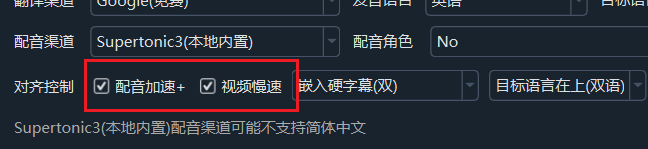
When the dubbing ratio > 1.2x, audio speedup and slow video each handle half the time difference.
Best for: Dubbing significantly longer than original Pros: Side effects of each strategy cancel out — best overall result
Strategy 4: No speed changes — Remove silences and align subtitles
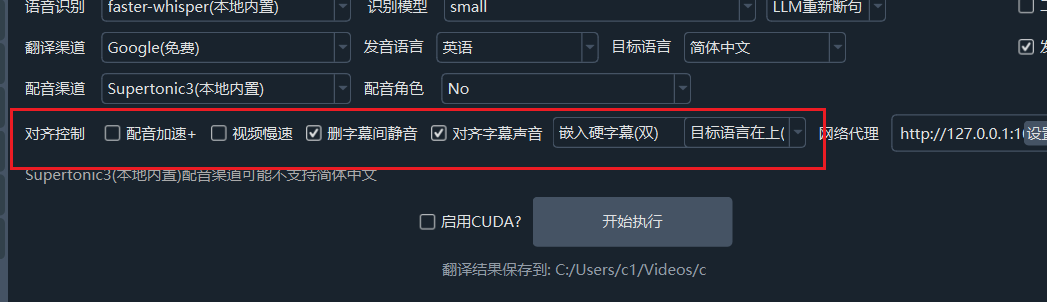
Keep audio and video at original speed for best quality. Use Remove in-between silences and Sync subtitles & speech to minimize desync caused by duration changes.
3. Corresponding Settings in the Software
Main Interface
| Setting | Location | Description |
|---|---|---|
| Audio speedup | Main interface, Row 5 | Speed up overly long dubbing |
| Slow video | Main interface, Row 5 | Slow down video to match dubbing |
| Dubbing speed | Main interface, Row 5 | Overall adjustment of dubbing speed |
Advanced Options
| Setting | Location | Description |
|---|---|---|
| Max audio speedup ratio | Subtitle/Sound/Video Sync | Default 100 |
| Max video slowdown ratio | Subtitle/Sound/Video Sync | Default 10 |
| Remove padding silence | Subtitle Dubbing | Optional |
4. Best Practices
- Enable "Audio speedup" by default — handles most scenarios.
- When dubbing is much longer than original, also enable "Slow video".
- When translating Chinese to English, set "Dubbing speed" to
+10or+15to increase overall speed. - When using
clonerole, ensure subtitle duration is limited to 3-10 seconds. - Use "Second-pass recognition": Re-transcribe dubbed audio for more precise timestamps.
5. Technical Principles
The software uses the SpeedRate alignment engine. The core logic:
- Preprocessing: Extends each subtitle's end time to the next subtitle's start time (absorbing silent gaps).
- Calculation: Determines the alignment strategy based on the dubbing/subtitle duration ratio.
- Execution: Audio speed change (Rubber Band or FFmpeg atempo) + video speed change (PTS setpts).
- Merging: All processed audio segments are concatenated in order, with silence filling the gaps.
For detailed technical implementation, see Audio/Video Sync Principles