
Speech Recognition Channel: Faster-Whisper-XXL
What is this?
Faster-Whisper-XXL is a standalone executable (faster-whisper-xxl.exe) provided by the Purfview/whisper-standalone-win project. It packages the faster-whisper speech recognition engine into a single exe file that can be used without installing a Python environment.
pyVideoTrans has built-in integration for this tool. After selecting this channel, you can directly invoke faster-whisper-xxl.exe for speech recognition.
Use Cases
- Users who don't want to install Python and prefer a plug-and-play experience
- Users who have already downloaded
faster-whisper-xxl.exeand want to use it directly in pyVideoTrans - Users who need offline recognition with high accuracy
- Users with an NVIDIA GPU for the best performance
Prerequisites
| Requirement | Details |
|---|---|
| faster-whisper-xxl.exe | Must be downloaded from GitHub |
| NVIDIA GPU (recommended) | Supports CUDA acceleration with significant speed improvement; CPU mode available without GPU |
| FFmpeg (optional) | May be needed for some audio formats |
Download
Download faster-whisper-xxl.exe from:
https://github.com/Purfview/whisper-standalone-win/releases
Extract to any folder (path must not contain Chinese characters or spaces).
Using in pyVideoTrans
Configuration Steps
- Download and extract
faster-whisper-xxl.exe - Open
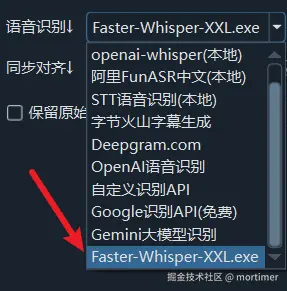
pyVideoTrans - In the speech recognition channel, select faster-whisper-xxl.exe
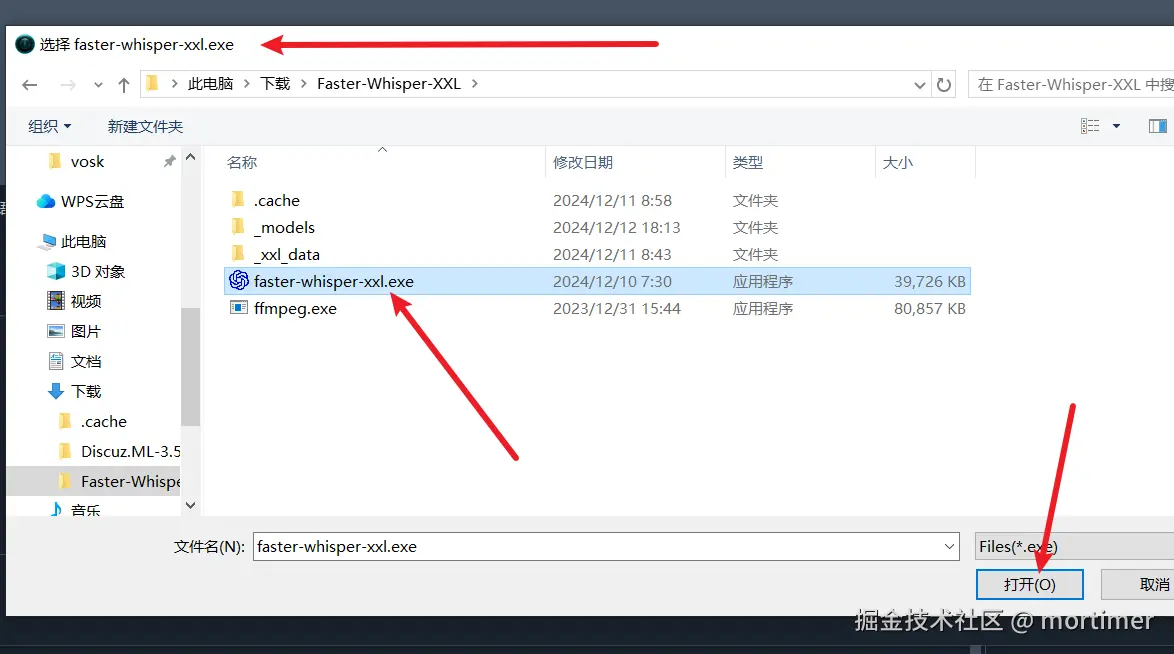
- In the file picker, locate
faster-whisper-xxl.exe - Select it and you're ready to use
Parameter Reference
When pyVideoTrans calls faster-whisper-xxl.exe, it automatically passes the following parameters:
| Parameter | Description |
|---|---|
| Audio file path | The audio file to recognize |
-pp | Pretty Print — formatted output |
-f srt | Output format as SRT subtitles |
-ct | Compute type (default int8, configurable in settings) |
-l | Recognition language code |
--model | Model name to use |
--output_dir | Output directory (cache folder) |
--initial_prompt | Initial prompt (optional, improves domain-specific recognition) |
Custom Additional Parameters
Tip:
faster-whisper-xxl.exesupports many parameters. For flexibility, the software only includes the essential model, language, and output format parameters. You can add additional parameters by creating a file calledpyvideotrans.txtin the same directory asfaster-whisper-xxl.exe.Note: Do not duplicate the model size, language, or output format parameters, as this will cause errors.
For example, create pyvideotrans.txt in the same directory as faster-whisper-xxl.exe:
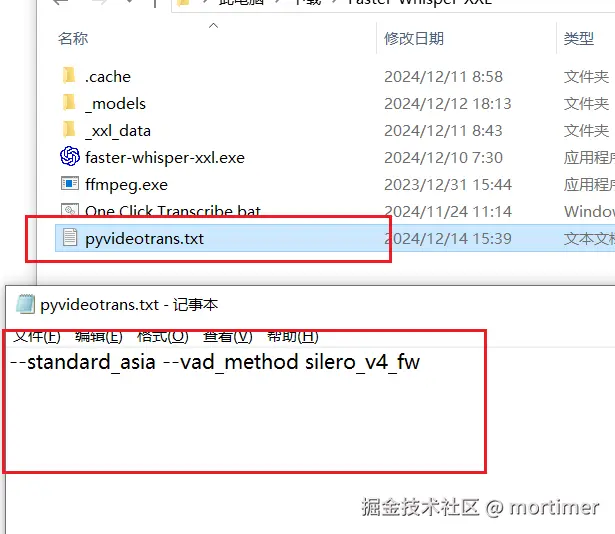
The file contents should be the additional parameters you want to add, separated by spaces.
Optimal Configuration
| Setting | Recommended Value | Notes |
|---|---|---|
| Model | large-v3 or large-v3-turbo | Highest accuracy, suitable for most scenarios |
| Compute type (ct) | int8 | Balanced speed and accuracy; use float16 with a GPU |
| Language | Specify the language | More accurate than auto-detection |
| Initial prompt | Domain-related terminology | Improves recognition accuracy for specialized vocabulary |
| Compute device | GPU (CUDA) | Strongly recommended with NVIDIA GPU |
Common Issues
Q: "File not found" after selecting the exe?
A: Ensure the path is correct and does not contain Chinese characters or spaces. Place the exe in a pure-English path.
Q: Recognition is very slow?
A:
- Check if GPU mode is enabled (requires NVIDIA GPU and CUDA support)
- Try switching compute type to
int8(faster) - Use a smaller model (e.g.,
baseorsmall) for faster speed
Q: Recognition results are inaccurate?
A:
- Try a larger model (e.g.,
large-v3) - Set the correct language parameter
- Add an initial prompt containing domain terms or names from the audio
Q: Parameters in pyvideotrans.txt don't take effect?
A: Ensure the file is in the same directory as faster-whisper-xxl.exe, not in the pyVideoTrans installation directory. Parameters should be separated by spaces.
Q: How to check which models are supported?
A: Visit https://github.com/Purfview/whisper-standalone-win/releases for project documentation. Supported models are the same as faster-whisper.