
Advanced Options Reference
In Menu → Tools / Options → Advanced Options, you can customize various parameters for finer control.
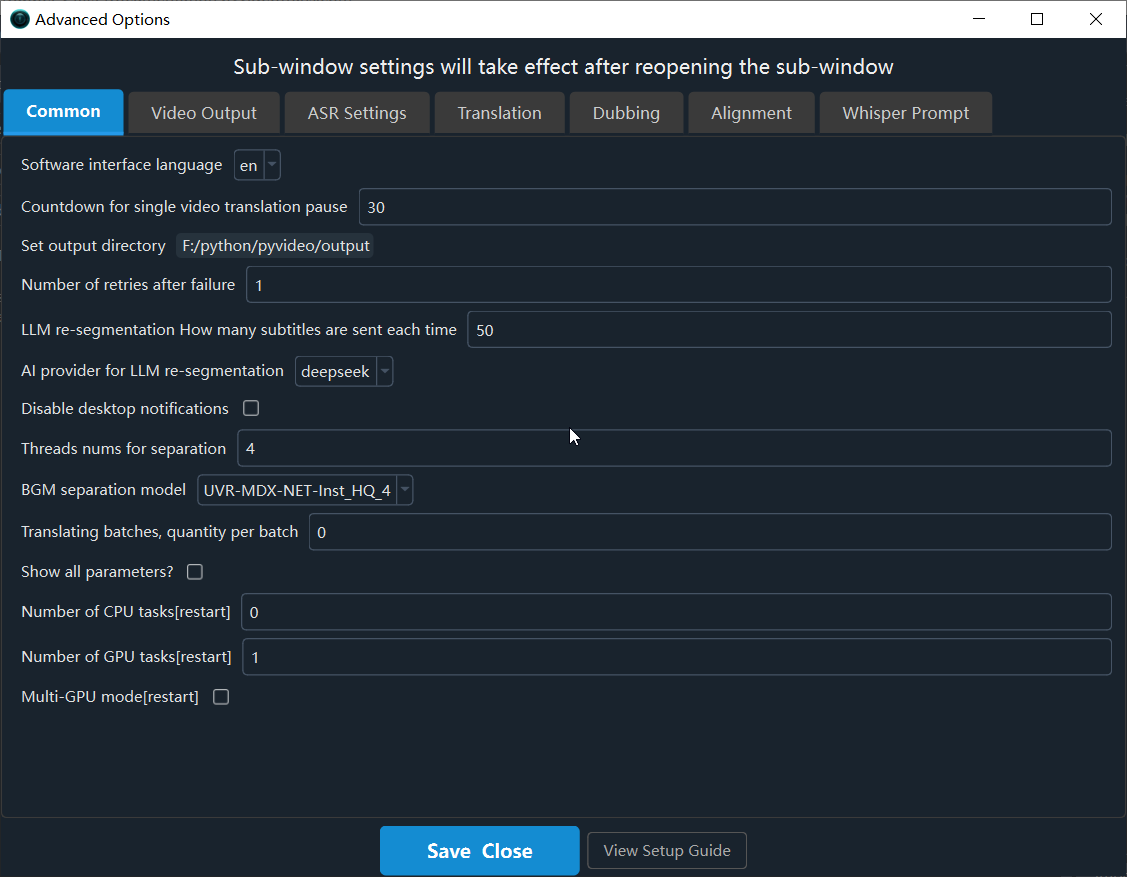
【Common】
Software interface language: Set the software's interface language. Requires a restart to take effect.Countdown for single video translation pause: Countdown in seconds for a single video translation.Set output directory: Directory to save results (STT, TTS, TransSubtitles). Defaults to the 'output' folder.Number of retries after failure: Number of retries after failureLLM Correction errors How many subtitles are sent each time: When LLM Correction errors in the LLM large model, the number of subtitles se nt each time is important. A larger value results in better sentence segmentation. Sending all subtitles at once is optimal, but this is limited by the maximum output token and context (max_token). An excessively long input may exceed the AI limit and fail. The default is 20 subtitles.AI provider for LLM Correction errors: AI provider for LLM Correction errorsDisable desktop notifications: Disable desktop notifications for task completion or failure.Threads nums for separation: The more threads used for separation of human and background voices, the faster the process, but the more res ources it consumes.BGM separation model: Select the model used when separating background noise.Translating batches, quantity per batch: When translating in batches, set the number of lines to translate simultaneously in each batch he re.Show all parameters?: To avoid confusion caused by too many parameters, most parameters are hidden by default on the main interface. Selec ting this option will switch to displaying all parameters by default.Number of CPU tasks[restart]: Process Maximum for CPUNumber of GPU tasks[restart]: The number of GPU tasks that can be executed simultaneously should be set to 1 unless video memory very larg eForce the operation of heavy-duty equipment: Force the operation of heavy-duty equipment; do not tamper with it unless you know what you a re doing.
【Video Output】
Video output quality control (CRF): Constant Rate Factor (CRF) for video quality. 0=lossless (huge file), 51=low quality (small file).Output video compression preset: Controls the encoding speed vs. quality balance (e.g., ultrafast, medium, slow). Faster means larger file s.H.264/H.265 encoding: Video codec: libx264 (better compatibility) or libx265 (higher compression).Output video format (mp4/mkv): Output video format (mp4/mkv)Variable frame rate (vfr)/fixed frame rate (cfr): When there is slow-motion video processing, variable frame rate (VRF) works better, whil e fixed frame rate (CFR) has better compatibility.Force software video encoding?: Force software encoding (slower but more compatible). Hardware encoding is preferred by default.ffmpeg decode video use cuda: When compositing videos, prioritize hard decoding; it's fast but prone to errors.Custom FFmpeg command arguments: Custom FFmpeg command arguments, added before the output file argument.
【ASR Settings】
Select VAD: Select VADVAD: Speech probability threshold: VAD: Minimum probability for an audio chunk to be considered speech.no speech threshold: no speech thresholdVAD:max speech duration(s): VAD: Maximum duration (s) of a single speech segment before splitting.VAD:min speech duration(ms): If a subtitle's duration is less than this value in milliseconds, attempt to merge it into an adjacent subtit le.VAD:Min silence duration for split(ms): VAD: Minimum silence duration (ms) to mark the end of a segment.The model used for secondary recognition: The model used for secondary recognition (always using the Faster-Whisper channel)Recognition(2): max duration(s): Maximum speech duration (seconds) during secondary recognition. Limits the maximum length of a single spe ech segment. Forced segmentation occurs if this length is exceeded. Enter a number in seconds.Recognition(2): min duration(ms): Shortest speech duration (milliseconds) during secondary recognition. If a subtitle's duration is less t han this value in milliseconds, attempt to merge it into an adjacent subtitle. Unit: milliseconds.Model for speaker separation: The model used for speaker separation. The default is the built-in model, supporting both Chinese and Englis h. Pyannote is optional. If selected, you must have a token from https://huggingface.co and agree to the Pyannote licensing agreement. For details, please visit the URL for a tutorial: https://pvt9.com/shuohuarenYour token from huggingface.co: Enter your token from huggingface.co. Otherwise, you cannot use Pyannote speaker separation. For details, please see the tutorial: https://pvt9.com/shuohuarenCompute data type: Compute type for faster-whisper (e.g., int8, float16, float32).Recognition accuracy (beam_size): Beam size for transcription (1-5). Higher is more accurate but uses more VRAM.Recognition accuracy (best_of): Best-of for transcription (1-5). Higher is more accurate but uses more VRAM.Enable context awareness: Condition on previous text for better context (uses more GPU, may cause repetition).temperature: temperaturerepetition penalty: Increasing this value helps reduce repetitionscompression ratio threshold: Decrease this value helps reduce repetitionshotwords: hotwordsfaster-whisper models: Comma-separated list of model names for faster-whisper modes.whisper.cpp models: Comma-separated list of model names for whisper.cpp mode.Gemini speech recognition batch slice count: Number of audio slices per request for Gemini recognition. Larger values improve accuracy but increase failure rate.Convert Traditional to Simplified Chinese subtitles: Force conversion of recognized Traditional Chinese to Simplified Chinese.Remove punctuation at end subtitles?: Remove punctuation at the end of subtitles?Cloud API pauses after each recognition/Seconds: The number of seconds the cloud API pauses after each recognition to prevent exceeding th e frequency limit.
【Translation】
Batch size (lines) for traditional translation: Number of subtitle lines per request for traditional translation.Batch size (lines) for AI translation: Number of subtitle lines per request for AI translation.Pause (s) after each translation request: Delay (in seconds) between translation requests to prevent rate-limiting.Send full SRT format for AI translation: Send full SRT format content when using AI translation.AI temperature for translation subtitles: AI models temperature,default is 1.0AI translation includes all original subtitles for reference?: The AI translation channel includes all original subtitles for referenc e.
【Dubbing】
Concurrent dubbing threads: Number of concurrent threads for dubbing.Pause (s) after each dubbing request: Delay (in seconds) between dubbing requests to prevent rate-limiting.Remove the mute buffer each subtitle audio: Remove the mute buffer before and after each subtitle audio. Selecting this option will improv e audio-visual synchronization, but may make the ending feel rushed.Save dubbed audio for each subtitle line: Save the dubbed audio for each individual subtitle line.Text Text normalization: Text normalization before dubbingThe higher concurrent of EdgeTTS: The higher the concurrent voice-over capacity of the EdgeTTS channel, the faster the speed, but rate thr ottling may fail.Retries after EdgeTTS failure: Number of retries after EdgeTTS channel failureChatTTS voice timbre value: ChatTTS voice timbre value.
【Alignment】
Maximum audio speed-up rate: Maximum audio speed-up rate. Default: 100.Maximum video slow-down rate: Maximum video slow-down rate. Default: 10 (cannot exceed 10).Number of characters per line for CJK: Number of characters per line for Chinese, Japanese, and Korean subtitles; more than this will resu lt in a line breakNumber of words per line for Other: Number of words per line for subtitles in other languages; more than this will result in a line break
【Whisper Prompt】
...