
MiniMaxi Dubbing and Translation Channel
What is it?
MiniMaxi (also known as Hailuo AI) is an AI service platform from MiniMax, offering text-to-speech and translation features. It supports 7 emotion expressions and produces natural-sounding voices.
Prerequisites:
- Register a MiniMaxi account
- Complete identity verification (for users in China)
- Obtain an API Key
Note: Domestic (minimaxi.com) and overseas (minimax.io) accounts and balances are completely separate.
Registration
Users in China
- Registration URL: https://platform.minimaxi.com/login
Overseas Users
- Registration URL: https://platform.minimax.io/login
Important: Domestic (minimaxi.com) and overseas (minimax.io) accounts, API Keys, and balances are completely separate and cannot be shared.
Translation Integration
Step 1: Get an API Key
- After logging in, visit: https://platform.minimaxi.com/user-center/basic-information/interface-key
- Create and copy your API Key
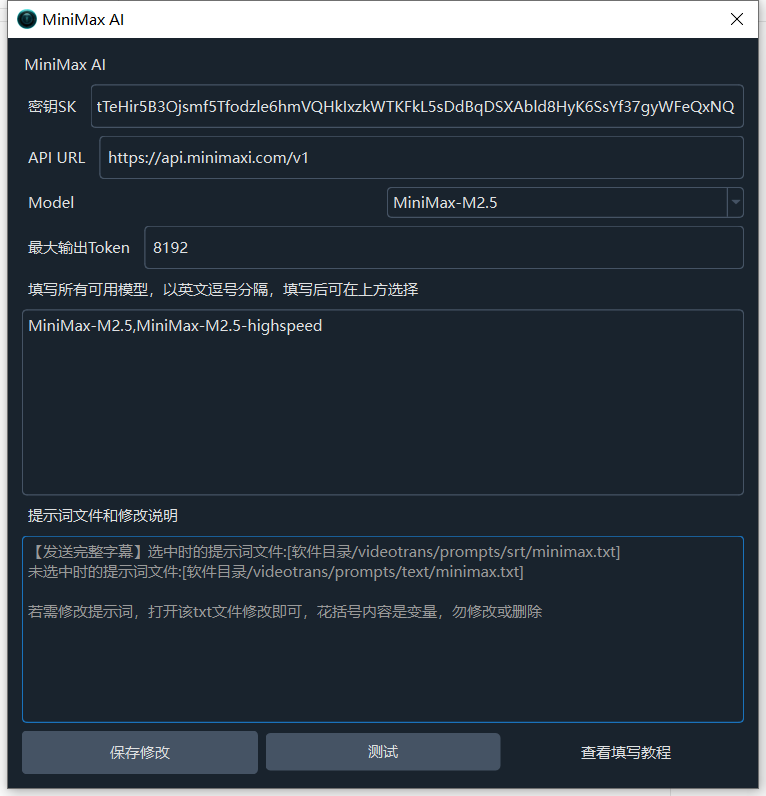
Step 2: Configure the Software
- Open the software and go to Menu → Translation Settings → Minimax AI
- Fill in the following:
- API Address:
- Users in China:
https://api.minimaxi.com/v1 - Overseas users:
https://api.minimax.io/v1
- Users in China:
- SK: Paste the API Key
- API Address:
- Click the test button to verify the connection
- Save the settings
Step 3: Use Translation
- Return to the main interface
- Select
Minimax AIfrom the Translation Channel dropdown - Start your translation task
Dubbing Integration
Step 1: Get an API Key
Same as the translation section — use the same API Key.
Step 2: Configure the Software
- Open the software and go to Menu → TTS Settings → MiniMaxi API
- Fill in the following:
- API Address:
- Users in China: select
api.minimaxi.com - Overseas users: select
api.minimax.io
- Users in China: select
- SK: Paste the API Key
- API Address:
- Click the test button to verify the connection
- Save the settings


Step 3: Select an Emotion
MiniMaxi supports 7 emotion expressions:
- Happy
- Sad
- Angry
- Fearful
- Disgusted
- Surprised
- Neutral
You can select a default emotion in the settings. However, testing shows the difference is minimal — adjust as needed.
Step 4: Start Dubbing
- Return to the main interface
- Select
MiniMaxifrom the Voice Channel dropdown - Choose the target language and voice
- Click the dubbing button to start
Rate Limit Settings
Important: Unless you have a high-tier MiniMaxi enterprise account, you'll likely encounter frequent
rate limiterrors.
You must configure the following:
- Go to Menu → Tools/Options → Advanced Options → Dubbing Adjustments
- Set Concurrent Dubbing Count to
1 - Set Pause After Dubbing to
25seconds or more
Regular accounts are limited to 3 requests per minute — roughly one every 20 seconds.

Notes for Users in China
⚠️ After logging in, you'll need to complete identity verification using a bank card and the phone number registered with your bank. If you haven't completed this step, tests may fail.
Additionally, when using this service, go to Menu → Tools/Options → Advanced Options → Dubbing Adjustments:
- Set concurrent dubbing count to
1 - Set the pause after dubbing to a value greater than
25seconds
Otherwise, you'll likely exceed the rate limit.
Common Errors
| Error | Cause | Solution |
|---|---|---|
| Rate limit | Too many requests | Reduce concurrency, increase pause duration |
| Authentication error | Invalid API Key | Verify the key is correct |
| Identity verification failed | Verification not completed | Complete bank card identity verification |
| Insufficient balance | Account needs funding | Top up your MiniMaxi account |