
Use a Single FFmpeg Command to Tame Noise and Improve Speech Transcription Accuracy
When I do speech transcription, the biggest headache is noise. Recordings often contain wind noise, electrical hum, keyboard sounds, echo... When these background noises are too prominent, transcription models tend to miss words or even fail to recognize entire sentences.
There are many noise reduction methods online, most of which are AI-based "large model" denoising, such as RNNoise, Deepfilture2, resemble-enhance, etc.
The results are indeed good, but the problems are significant too:
- Models are often hundreds of MB or even several GB in size;
- Downloads are slow and prone to interruption due to domestic network conditions;
- Processing is slow, not suitable for batch jobs.
- Most importantly, they are not very suitable for packaging and distribution.
For me, the goal is simple: I just want to clean up the audio a bit before transcription to reduce the number of missed sentences. The denoising doesn't have to be perfect, it just needs to be simple enough and lightweight enough.
Initial Attempt: afftdn
Initially, I used FFmpeg's built-in frequency-domain noise reduction filter:
ffmpeg -i 1.wav -af afftdn 1_denoised.wavThe command is indeed short, but—it had almost no effect. Subtle background noise, wind noise, and breathing sounds remained largely unchanged.
I tried adjusting the parameters:
-afftdn=nf=-30The intensity did increase a bit, but part of the human voice was also "eaten," making the sound muffled and watery. I thought maybe a combination of several filters was needed.
Improved Solution: A Combination of Four Filters
Finally, I settled on the following one-line command:
ffmpeg -i 1.wav -af "highpass=f=80,afftdn=nf=-25,loudnorm,volume=2.0" 1_clean.wavThe noise reduction effect improved significantly, and recognition accuracy became noticeably more stable.
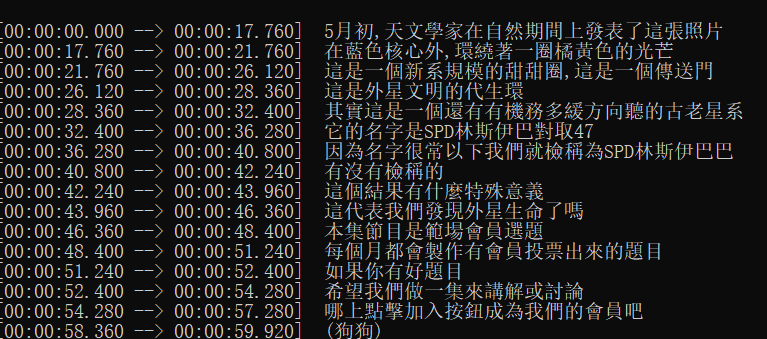
The following tests were conducted using Whisper's tiny model.
- This is the speech transcription result without noise reduction. Clearly, several sentences at the beginning were missed.
- This is the speech transcription result after applying this noise reduction parameter set.
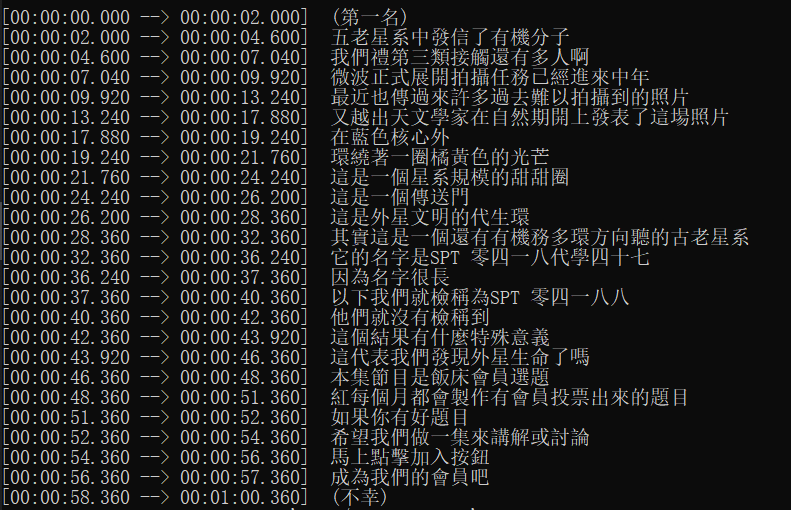
The improvement is quite evident. Not only are sentences no longer missed, but sentence segmentation is also more reasonable.
Let's look at its components👇
1️⃣ highpass=f=80
A high-pass filter that removes low-frequency noise below 80Hz. This part typically consists of environmental hum or microphone self-noise, with minimal impact on the human voice. Adding this immediately makes the overall sound much "cleaner."
2️⃣ afftdn=nf=-25
The core noise reduction filter. nf stands for noise floor threshold, default is -20. I adjusted it to -25, slightly stronger but not too blurry. This parameter acts like a "strength control"—the lower the value, the stronger the noise reduction.
3️⃣ loudnorm
Loudness normalization. After noise reduction, audio volume can sometimes fluctuate. loudnorm makes the overall sound more natural and balanced.
4️⃣ volume=2.0
Finally, amplify the volume by two times to compensate for the energy loss caused by noise reduction. If the volume is too high or causes clipping, you can adjust it to 1.5. In some scenarios, 1.5 works better than 2.0.
🤔 Why Not Use AI Noise Reduction?
Some might ask: Doesn't FFmpeg also have the neural network-based arnndn? It's more effective.
Yes, it is indeed more powerful, but the problem is—it's troublesome. Many FFmpeg versions don't even compile this filter by default. To use it, you need to:
- Download the
.rnnnmodel yourself; - Configure the path;
- Ensure compatibility across different systems;
- Include the model file when sharing the script.
For someone like me who wants a command that runs out-of-the-box and can be shared with other novice users, this is not practical.
In contrast, highpass + afftdn is a pure built-in solution, doesn't rely on external models, and is fast with good compatibility.
⚡ Hands-on Experience
I use this command as a preprocessing step before speech transcription, and the results are very stable. Environmental noise is significantly reduced, and the speech recognition model's miss rate has dropped considerably.
More importantly:
- It runs in just a few seconds;
- No extra files are needed;
- Works on any system;
- Batch processing is easy.
For needs that prioritize simple deployment, fast execution, and controllable results, this command hits the "sweet spot."
✅
There is no perfect solution for noise reduction. AI models can achieve excellence, but the barrier is high; Traditional filter effects are moderate, but they are stable and universal.
My goal isn't audio restoration, but to make speech transcription a bit more reliable. And this one-line command strikes a good balance between "effectiveness" and "simplicity":
ffmpeg -i 1.wav -af "highpass=f=80,afftdn=nf=-25,loudnorm,volume=1.5" 1_clean.wav