
Xiaomi TTS Voice Channel
What is it?
Xiaomi TTS is a speech synthesis service from Xiaomi, powered by their large language model technology. Currently supports Chinese and English dubbing, with free quota available.
Prerequisites:
- Register a Xiaomi developer account
- Obtain an API Key
- pyVideoTrans v3.98-327+ or later
Step 1: Get an API Key
- Visit: https://platform.xiaomimimo.com/#/console/api-keys
- Register and log in to a Xiaomi developer account
- Create an API Key
- Copy and save it
Step 2: Configure the Software
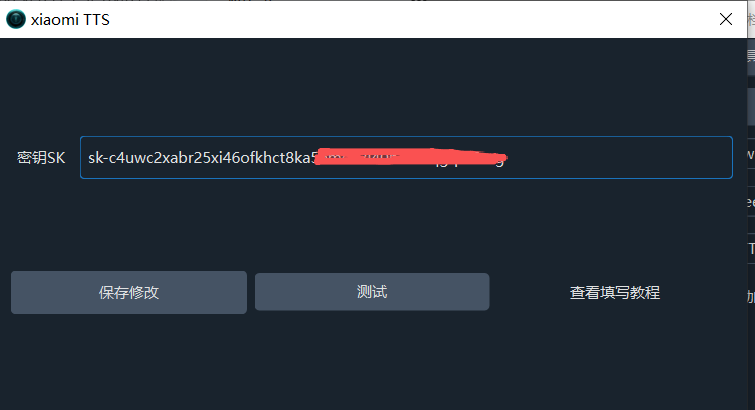
- Open the software and go to Menu → TTS Settings → Xiaomi TTS
- Paste the API Key
- Click the Test button
- If no errors occur and audio plays, it's working
- Click Save
Step 3: Start Dubbing
- Return to the main interface
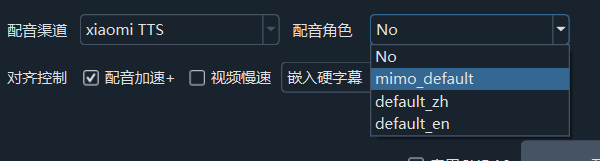
- Select
xiaomi TTSfrom the Voice Channel dropdown - Select the target language (currently Chinese and English only)
- Choose a voice
- Start dubbing
Available Voices
Xiaomi TTS currently supports only the following voices:
mimo_default- Default voice (female)default_zh- Chinese default voice (female)default_en- English default voice (female)
Important Notes
- After Xiaomi's free trial period ends, you'll need to top up your Xiaomi model console balance to continue
- Currently only supports Chinese and English
- Currently only offers female voices
Troubleshooting
| Issue | Solution |
|---|---|
| Test failed | Verify your API Key is correct |
| Insufficient balance | Top up at the Xiaomi console |
| Language unavailable | Currently only Chinese and English are supported |
| Limited voice selection | Xiaomi TTS currently has few voices — consider other channels |